What's inside
Form content
U.S. Corporation Income Tax Return
For calendar year 2024 or tax year beginning
, 2024, ending
, 20
Go to www.irs.gov/Form1120 for instructions and the latest information.
2024
TYPE
OR
PRINT
Name
Number, street, and room or suite no. If a P.O. box, see instructions.
City or town, state or province, country, and ZIP or foreign postal code
A Check if:
1a Consolidated return
(attach Form 851) b Life/nonlife consoli- dated return .
.
2 Personal holding co.
(attach Sch. PH) .
3 Personal service corp.
(see instructions) .
4 Schedule M-3 attached
B Employer identification number
C Date incorporated
D Total assets (see instructions)
$
E Check if: (1)
Initial return
(2)
Final return
(3)
Name change
(4)
Address change
Income
1a
Gross receipts or sales .
.
.
.
.
.
.
.
.
.
.
.
.
.
.
.
.
.
1a b
Returns and allowances .
.
.
.
.
.
.
.
.
.
.
.
.
.
.
.
.
.
1b c
Balance. Subtract line 1b from line 1a .
.
.
.
.
.
.
.
.
.
.
.
.
.
.
.
.
.
.
.
.
.
1c
2
Cost of goods sold (attach Form 1125-A) .
.
.
.
.
.
.
.
.
.
.
.
.
.
.
.
.
.
.
.
.
2
3
Gross profit. Subtract line 2 from line 1c .
.
.
.
.
.
.
.
.
.
.
.
.
.
.
.
.
.
.
.
.
3
4
Dividends and inclusions (Schedule C, line 23) .
.
.
.
.
.
.
.
.
.
.
.
.
.
.
.
.
How to fill it
Fill or edit this form in MePDF
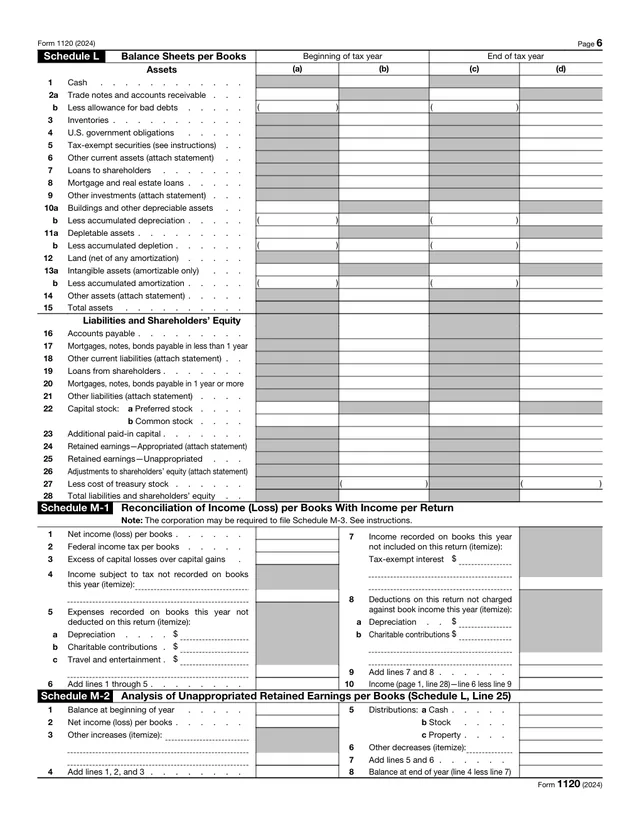
- Preview page 6 to confirm the form name and revision.
- Select Fill form to answer the form one page at a time.
- Type an answer for each field; checkboxes and choices use the form’s own options.
- Preview the finished pages, then download the flattened PDF.
- The downloaded copy is image-only, so it cannot be edited as a form again.
Keep the tax year and filing status consistent on every page. The editor keeps the original layout while you fill the existing fields.