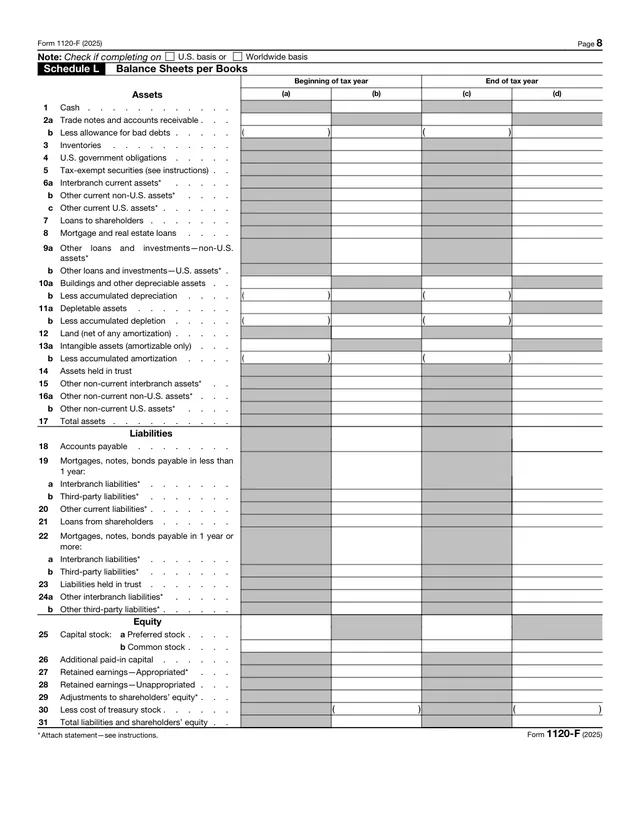
What's inside
Form content
U.S. Income Tax Return of a Foreign Corporation
For calendar year 2025, or tax year beginning
, 2025, and ending
, 20
Go to www.irs.gov/Form1120F for instructions and the latest information.
2025
Name
Number and street. If a P.O. box, see instructions.
Room or suite number
City or town
State or province
Country
ZIP or foreign postal code
Employer identification number
Check box(es) if:
Name or address change
First post-merger return
Schedule M-3 attached
Initial return
Final return
Amended return
Protective return
A
Country of incorporation
B
Foreign country under whose laws the income reported on this return is also subject to tax
C Date incorporated
D (1) Location of corporation’s primary books and records (city, province or state, and country)
(2) Principal location of worldwide business
(3) If the corporation maintains an office or place of business in the United States, check here
.
.
.
.
.
.
.
.
.
E If the corporation had an agent in the United States at any time during the tax year, enter:
(1) Type of agent
(2) Name
(3) Address
F See the instructions and enter the corporation’s principal:
(1) Business activity code number
(2) Business activity
(3) Product or service
G
Check
How to fill it
Fill or edit this form in MePDF
- Preview page 8 to confirm the form name and revision.
- Select Fill form to answer the form one page at a time.
- Type an answer for each field; checkboxes and choices use the form’s own options.
- Preview the finished pages, then download the flattened PDF.
- The downloaded copy is image-only, so it cannot be edited as a form again.
Keep the tax year and filing status consistent on every page. The editor keeps the original layout while you fill the existing fields.