What's inside
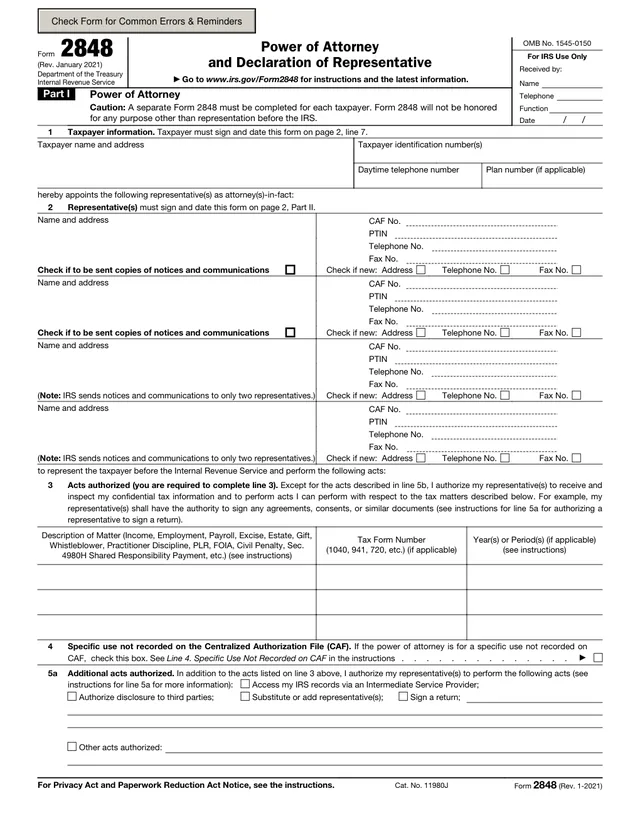
Form content
(Rev. January 2021)
Power of Attorney and Declaration of Representative
▶ Go to www.irs.gov/Form2848 for instructions and the latest information.
For IRS Use Only
Received by:
Name
Telephone
Function
Date / /
Part I
Power of Attorney
Caution: A separate Form 2848 must be completed for each taxpayer. Form 2848 will not be honored for any purpose other than representation before the IRS.
1
Taxpayer information. Taxpayer must sign and date this form on page 2, line 7.
Taxpayer name and address
Taxpayer identification number(s)
Daytime telephone number
Plan number (if applicable) hereby appoints the following representative(s) as attorney(s)-in-fact:
2
Representative(s) must sign and date this form on page 2, Part II.
Name and address
Check if to be sent copies of notices and communications
CAF No.
PTIN
Telephone No.
Fax No.
Check if new: Address
Telephone No.
Fax No.
Name and address
Check if to be sent copies of notices and communications
CAF No.
PTIN
Telephone No.
Fax No.
Check if new: Address
Telephone No.
Fax No.
Name and address
(Note: IRS sends notices and communications to only two representatives.)
CAF No.
PTIN
Telephone No.
Fax No.
Check if new: Address
Telephone No.
Fax No.
How to fill it
Fill or edit this form in MePDF
- Preview page 1 to confirm the form name and revision.
- Select Fill form to answer the form one page at a time.
- Type an answer for each field; checkboxes and choices use the form’s own options.
- Preview the finished pages, then download the flattened PDF.
- The downloaded copy is image-only, so it cannot be edited as a form again.
Fill only the fields that apply and keep a copy of the finished PDF. The editor keeps the original layout while you fill the existing fields.