What's inside
Form content
Catalog Number 20312N www.irs.gov
Form 433-A (Rev. 7-2022)
(July 2022)
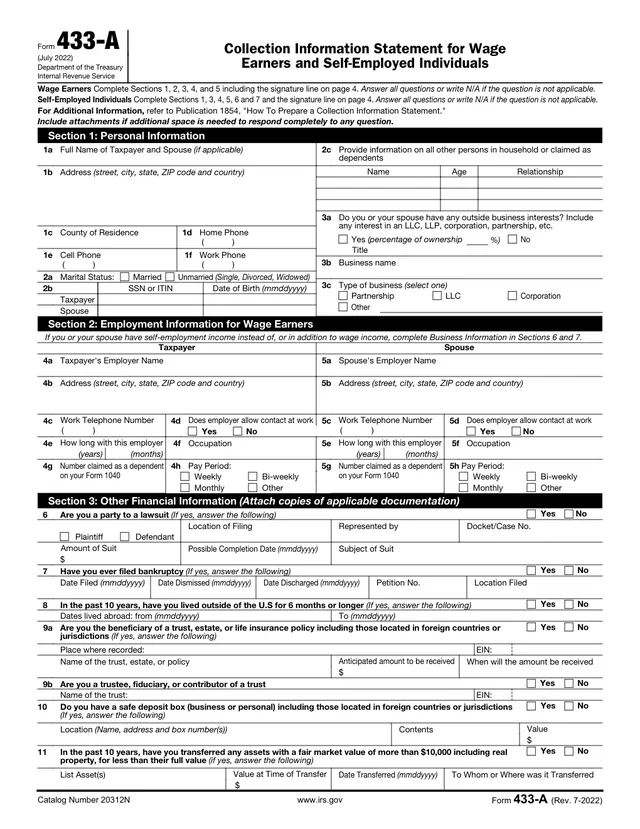
Collection Information Statement for Wage
Earners and Self-Employed Individuals
Wage Earners Complete Sections 1, 2, 3, 4, and 5 including the signature line on page 4. Answer all questions or write N/A if the question is not applicable.
Self-Employed Individuals Complete Sections 1, 3, 4, 5, 6 and 7 and the signature line on page 4. Answer all questions or write N/A if the question is not applicable.
For Additional Information, refer to Publication 1854, "How To Prepare a Collection Information Statement."
Include attachments if additional space is needed to respond completely to any question.
Section 1: Personal Information
1a
Full Name of Taxpayer and Spouse (if applicable)
1b
Address (street, city, state, ZIP code and country)
1d
Home Phone
(
)
1e
Cell Phone
(
)
1f
Work Phone
(
)
2a
Marital Status:
Married
Unmarried (Single, Divorced, Widowed)
2b
SSN or ITIN
Date of Birth (mmddyyyy)
Taxpayer
Spouse
1c
County of Residence
2c
Provide information on all other persons in household or claimed as dependents
Name
Age
Relationship
3a
Do you or your spouse have any outside business interests? Include any interest in
How to fill it
Fill or edit this form in MePDF
- Preview page 1 to confirm the form name and revision.
- Select Fill form to answer the form one page at a time.
- Type an answer for each field; checkboxes and choices use the form’s own options.
- Preview the finished pages, then download the flattened PDF.
- The downloaded copy is image-only, so it cannot be edited as a form again.
Fill only the fields that apply and keep a copy of the finished PDF. The editor keeps the original layout while you fill the existing fields.