What's inside
Form content
(April 2023)
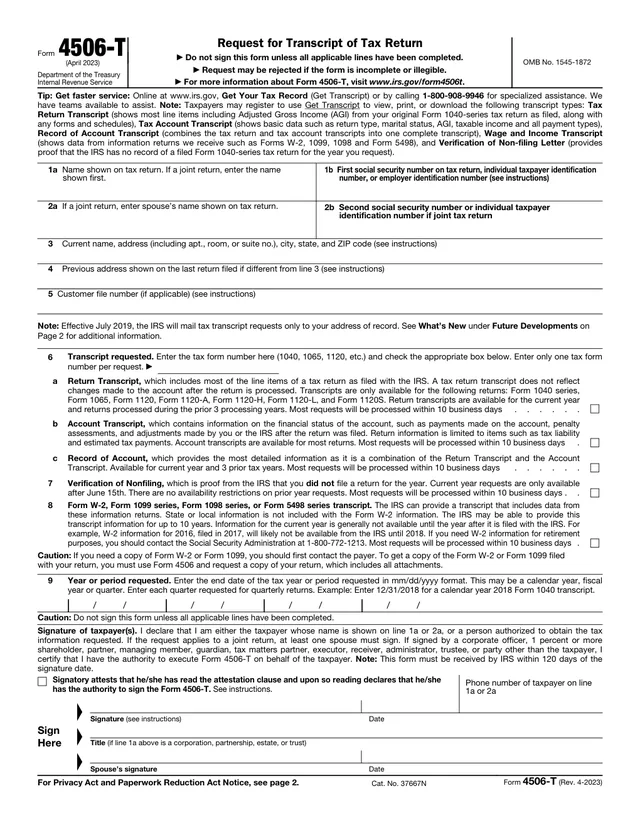
Request for Transcript of Tax Return
▶ Do not sign this form unless all applicable lines have been completed.
▶ Request may be rejected if the form is incomplete or illegible.
▶ For more information about Form 4506-T, visit www.irs.gov/form4506t.
Tip: Get faster service: Online at www.irs.gov, Get Your Tax Record (Get Transcript) or by calling 1-800-908-9946 for specialized assistance. We have teams available to assist. Note: Taxpayers may register to use Get Transcript to view, print, or download the following transcript types: Tax
Return Transcript (shows most line items including Adjusted Gross Income (AGI) from your original Form 1040-series tax return as filed, along with any forms and schedules), Tax Account Transcript (shows basic data such as return type, marital status, AGI, taxable income and all payment types),
Record of Account Transcript (combines the tax return and tax account transcripts into one complete transcript), Wage and Income Transcript
(shows data from information returns we receive such as Forms W-2, 1099, 1098 and Form 5498), and Verification of Non-filing Letter (provides proof that the IRS has no record of a filed Form 1040-series tax return
FieldsPage 1. 1a. Name shown on tax return. If a joint return, enter the name shown first.1b. First social security number on tax return, individual taxpayer identification number, or employer identification number (see instructions).2a. If a joint return, enter spouse's name shown on tax return.2b. Second social security number or individual taxpayer identification number if joint tax return.3. Current name, address (including apt., room, or suite no.), city, state, and Z I P code (see instructions).4. Previous address shown on the last return filed if different from line 3 (see instructions).5. Customer file number (if applicable). Input up to 10 numeric characters (see instructions).Note: Effective July 2019, the I R S will mail tax transcript requests only to your address of record. See What’s New under Future Developments on Page 2 for additional information. 6. Transcript requested. Enter the tax form number here (1040, 1065, 1120, etc.) and check the appropriate box below. Enter only one tax form number per request.6a. Return Transcript, which includes most of the line items of a tax return as filed with the I R S. A tax return transcript does not reflect changes made to the account after the return is processed. Transcripts are only available for the following returns: Form 1040 series, Form 1065, Form 1120, Form 1120-A, Form 1120-H, Form 1120-L, and Form 1120S. Return transcripts are available for the current year and returns processed during the prior 3 processing years. Most requests will be processed within 10 business days.6b. Account Transcript, which contains information on the financial status of the account, such as payments made on the account, penalty assessments, and adjustments made by you or the I R S after the return was filed. Return information is limited to items such as tax liability and estimated tax payments. Account transcripts are available for most returns. Most requests will be processed within 10 business days.6c. Record of Account, which provides the most detailed information as it is a combination of the Return Transcript and the Account Transcript. Available for current year and 3 prior tax years. Most requests will be processed within 10 business days.7. Verification of Nonfiling, which is proof from the I R S that you did not file a return for the year. Current year requests are only available after June fifteenth. There are no availability restrictions on prior year requests. Most requests will be processed within 10 business days.