What's inside
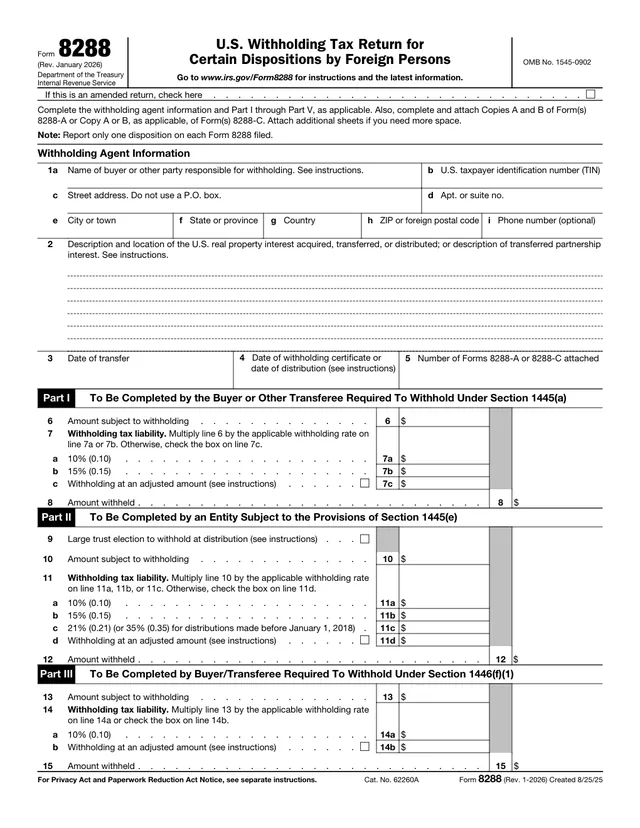
Form content
(Rev. January 2026)
U.S. Withholding Tax Return for
Certain Dispositions by Foreign Persons
Go to www.irs.gov/Form8288 for instructions and the latest information.
If this is an amended return, check here
.
.
.
.
.
.
.
.
.
.
.
.
.
.
.
.
.
.
.
.
.
.
.
.
.
.
.
.
.
.
Complete the withholding agent information and Part I through Part V, as applicable. Also, complete and attach Copies A and B of Form(s)
8288-A or Copy A or B, as applicable, of Form(s) 8288-C. Attach additional sheets if you need more space.
Note: Report only one disposition on each Form 8288 filed.
Withholding Agent Information
1a
Name of buyer or other party responsible for withholding. See instructions.
b U.S. taxpayer identification number (TIN) c
Street address. Do not use a P.O. box.
d Apt. or suite no.
e
City or town f State or province g Country h ZIP or foreign postal code i Phone number (optional)
2
Description and location of the U.S. real property interest acquired, transferred, or distributed; or description of transferred partnership interest. See instructions.
3
Date of transfer
4 Date of withholding certificate or date of distribution (see instructions)
5 Number of Forms 8288-A or 8288-C attached
Part I
T
How to fill it
Fill or edit this form in MePDF
- Preview page 1 to confirm the form name and revision.
- Select Fill form to answer the form one page at a time.
- Type an answer for each field; checkboxes and choices use the form’s own options.
- Preview the finished pages, then download the flattened PDF.
- The downloaded copy is image-only, so it cannot be edited as a form again.
Keep the tax year and filing status consistent on every page. The editor keeps the original layout while you fill the existing fields.