What's inside
Form content
2025
Return of U.S. Persons With Respect to
Certain Foreign Partnerships
Attach to your tax return.
Go to www.irs.gov/Form8865 for instructions and the latest information.
Attachment
Sequence No. 865
Information furnished for the foreign partnership’s tax year beginning
, 2025, and ending
, 20
Name of person filing this return
Filer’s identification number
Filer’s address (if you aren’t filing this form with your tax return)
Number and street. If P.O. box, see instructions.
Apt. or suite no.
City or town
State or province
Country
ZIP or foreign postal code
A
Category of filer (see Categories of Filers in the instructions and check applicable box(es)):
1
2
3
4
B
Filer’s tax year beginning
, 20
, and ending
, 20
C
Filer’s share of liabilities: Nonrecourse $
Qualified nonrecourse financing $
Other $
D
If filer is a member of a consolidated group but not the parent, enter the following information about the parent:
Name
EIN
Address
E Check if any excepted specified foreign financial assets are reported on this form. See instructions .
.
.
.
.
.
.
.
.
.
.
.
F
Information about certain other partners (see instructions)
(1) Name
(2) Address
(3) Identification number
(4) Check applicable b
How to fill it
Fill or edit this form in MePDF
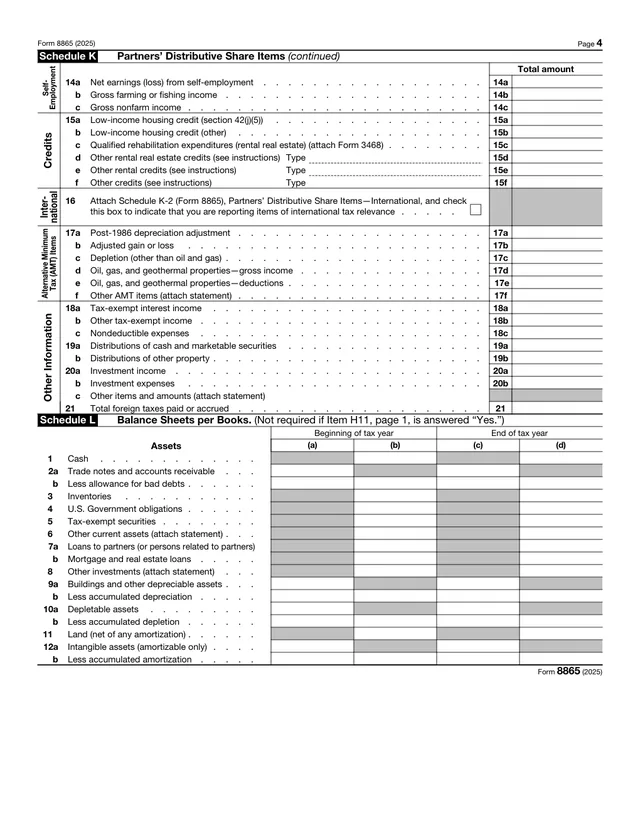
- Preview page 4 to confirm the form name and revision.
- Select Fill form to answer the form one page at a time.
- Type an answer for each field; checkboxes and choices use the form’s own options.
- Preview the finished pages, then download the flattened PDF.
- The downloaded copy is image-only, so it cannot be edited as a form again.
Fill only the fields that apply and keep a copy of the finished PDF. The editor keeps the original layout while you fill the existing fields.