What's inside
Form content
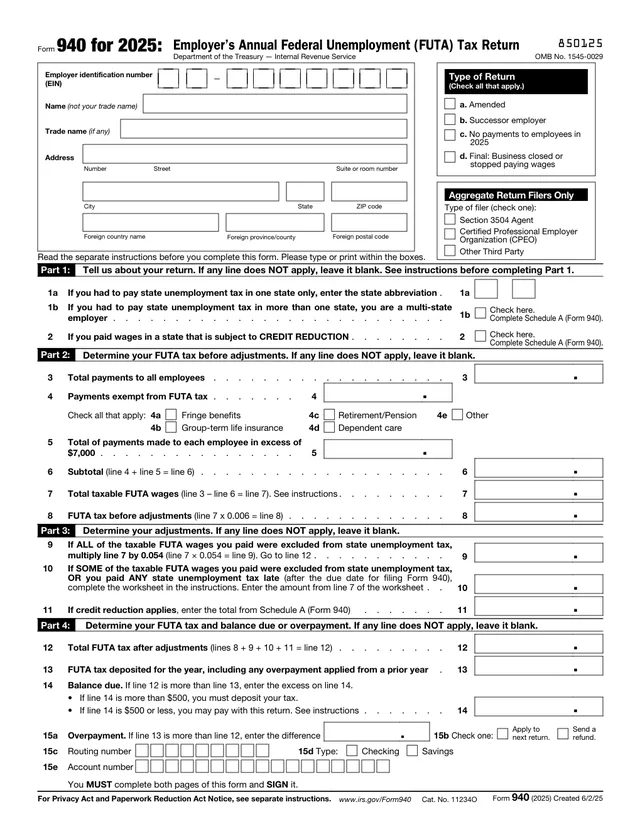
Form 940 for 2025:
Employer’s Annual Federal Unemployment (FUTA) Tax Return
850125
Employer identification number
(EIN)
—
Name (not your trade name)
Trade name (if any)
Address
Number Street Suite or room number
City
State
ZIP code
Foreign country name
Foreign province/county
Foreign postal code
Type of Return
(Check all that apply.) a. Amended b. Successor employer c. No payments to employees in
2025 d. Final: Business closed or stopped paying wages
Aggregate Return Filers Only
Type of filer (check one):
Section 3504 Agent
Certified Professional Employer
Organization (CPEO)
Other Third Party
Read the separate instructions before you complete this form. Please type or print within the boxes.
Part 1:
Tell us about your return. If any line does NOT apply, leave it blank. See instructions before completing Part 1.
1a
If you had to pay state unemployment tax in one state only, enter the state abbreviation .
1a
1 b
If you had to pay state unemployment tax in more than one state, you are a multi-state employer .
.
.
.
.
.
.
.
.
.
.
.
.
.
.
.
.
.
.
.
.
.
.
.
.
.
.
1b
Check here.
Complete Schedule A (Form 940).
2
If you paid wages in a state that is subject to CREDIT REDUCTION .
.
.
.
.
.
How to fill it
Fill or edit this form in MePDF
- Preview page 1 to confirm the form name and revision.
- Select Fill form to answer the form one page at a time.
- Type an answer for each field; checkboxes and choices use the form’s own options.
- Preview the finished pages, then download the flattened PDF.
- The downloaded copy is image-only, so it cannot be edited as a form again.
Keep the tax year and filing status consistent on every page. The editor keeps the original layout while you fill the existing fields.