What's inside
Form content
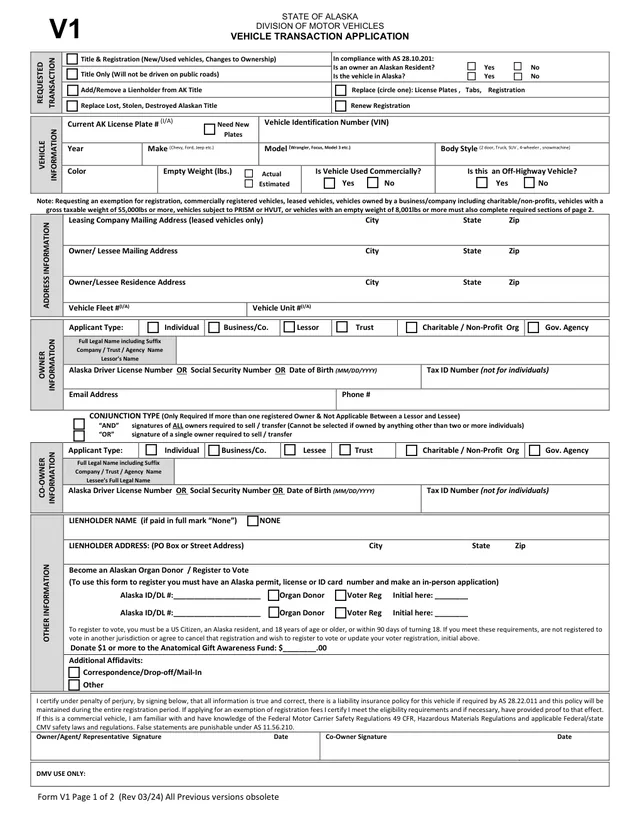
STATE OF ALASKA
DIVISION OF MOTOR VEHICLES
VEHICLE TRANSACTION APPLICATION
Form V1 Page 1 of 2 (Rev 03/24) All Previous versions obsolete
V1
REQUESTED
TRANSACTION
Title & Registration (New/Used vehicles, Changes to Ownership)
In compliance with AS 28.10.201:
Is an owner an Alaskan Resident?
Is the vehicle in Alaska?
Yes
Yes
No
No
Title Only (Will not be driven on public roads)
Add/Remove a Lienholder from AK Title
Replace (circle one): License Plates , Tabs, Registration
Replace Lost, Stolen, Destroyed Alaskan Title
Renew Registration
VEHICLE
INFORMATION
Current AK License Plate # (I/A)
Need New
Plates
Vehicle Identification Number (VIN)
Year
Make (Chevy, Ford, Jeep etc.)
Model (Wrangler, Focus, Model 3 etc.)
Body Style (2 door, Truck, SUV , 4-wheeler , snowmachine)
Color
Empty Weight (lbs.)
Actual
Estimated
Is Vehicle Used Commercially?
Yes No
Is this an Off-Highway Vehicle?
Yes No
Note: Requesting an exemption for registration, commercially registered vehicles, leased vehicles, vehicles owned by a business/company including charitable/non-profits, vehicles with a gross taxable weight of 55,000lbs or more, vehicles subject to PRISM or HVUT, or vehicles with an empty weight of 8,00
How to fill it
Fill or edit this form in MePDF
- Preview page 1 to confirm the form name and revision.
- Select Fill form to answer the form one page at a time.
- Type an answer for each field; checkboxes and choices use the form’s own options.
- Preview the finished pages, then download the flattened PDF.
- The downloaded copy is image-only, so it cannot be edited as a form again.
Fill only the fields that apply and keep a copy of the finished PDF. The editor keeps the original layout while you fill the existing fields.