What's inside
Form content
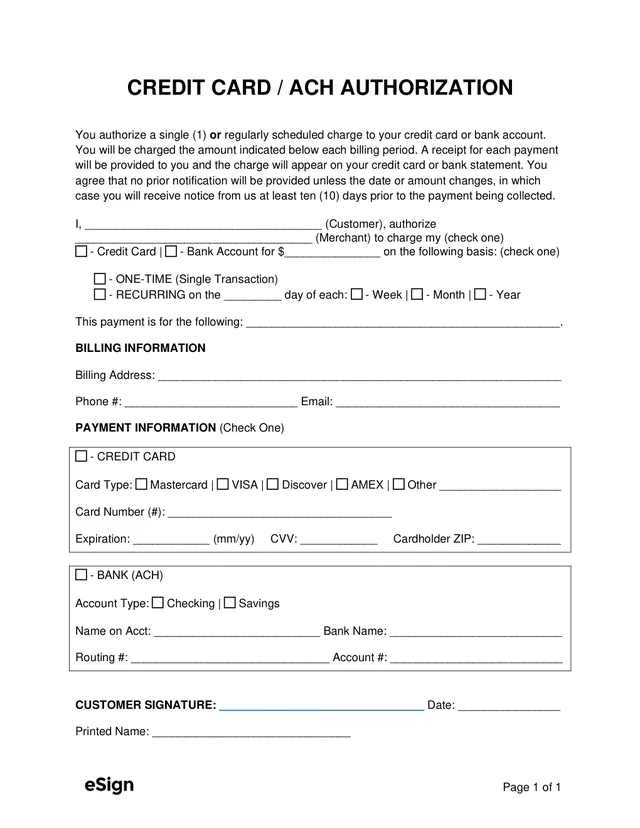
CREDIT CARD / ACH AUTHORIZATION
You authorize a single (1) or regularly scheduled charge to your credit card or bank account.
You will be charged the amount indicated below each billing period. A receipt for each payment will be provided to you and the charge will appear on your credit card or bank statement. You agree that no prior notification will be provided unless the date or amount changes, in which case you will receive notice from us at least ten (10) days prior to the payment being collected.
I, _____________________________________ (Customer), authorize
_____________________________________ (Merchant) to charge my (check one)
☐- Credit Card | ☐ - Bank Account for $_______________ on the following basis: (check one)
☐- ONE-TIME (Single Transaction)
☐- RECURRING on the _________ day of each: ☐ - Week | ☐ - Month | ☐ - Year
This payment is for the following: _________________________________________________.
BILLING INFORMATION
Billing Address: _______________________________________________________________
Phone #: ___________________________ Email: ___________________________________
PAYMENT INFORMATION (Check One)
☐- CREDIT CARD
Card Type: ☐ Mastercard | ☐ VISA | ☐ Discov
How to fill it
Fill or edit this form in MePDF
- Preview page 1 to confirm the form name and revision.
- Select Fill form to answer the form one page at a time.
- Type an answer for each field; checkboxes and choices use the form’s own options.
- Preview the finished pages, then download the flattened PDF.
- The downloaded copy is image-only, so it cannot be edited as a form again.
Copy figures exactly from the statement and keep the currency clear. The editor keeps the original layout while you fill the existing fields.