What's inside
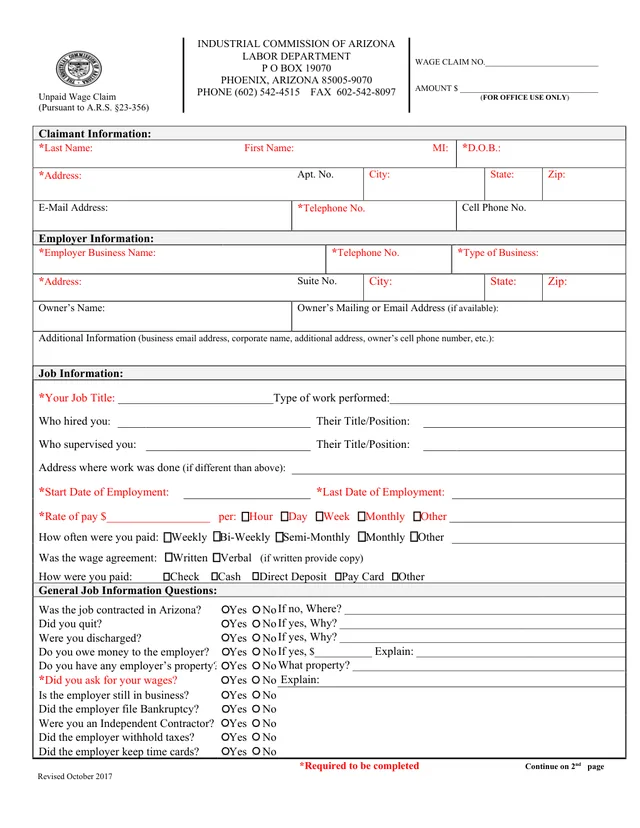
Form content
THE INDUSTRIAL COMMISSION OF ARIZONA
LABOR DEPARTMENT
P.O. Box 19070
STEVEN WELKER, DIRECTOR
Phoenix, Arizona 85005-9070
PHONE: (602) 542-4515
FAX: (602) 542-8097
DALE L. SCHULTZ, CHAIRMAN
JOSEPH M. HENNELLY, JR., VICE CHAIR
SCOTT P. LEMARR, MEMBER
STEVEN J. KRENZEL, MEMBER
JAMES ASHLEY, DIRECTOR
800 West Washington Street, Phoenix, Arizona 85007
2675 East Broadway Boulevard, Tucson, Arizona 85716 www.azica.gov
A Wage Claim form is used for unpaid or missing wages, bonus, vacation, mileage, NSF checks, and unauthorized deductions.
DO NOT use this form for wages paid below the current minimum wage or for sick pay.
INSTRUCTIONS FOR FILING A WAGE CLAIM
In order to best serve you, please follow these simple steps when filing your claim.
•
The completed Wage Claim can be submitted by: Email: [email protected], Fax: (602) 542-8097, or Mail.
•
Ensure all (*) asterisk areas are completed, otherwise the Department will not be able to process and investigate your claim.
•
Please contact the Department immediately if you move and/or change your address.
•
A copy of the Wage Claim and any attachments submitted will be sent to the employer. We are unable to accept any request for confidentiali
How to fill it
Fill or edit this form in MePDF
- Preview page 2 to confirm the form name and revision.
- Select Fill form to answer the form one page at a time.
- Type an answer for each field; checkboxes and choices use the form’s own options.
- Preview the finished pages, then download the flattened PDF.
- The downloaded copy is image-only, so it cannot be edited as a form again.
Match the employer's legal name and the employee's tax details. The editor keeps the original layout while you fill the existing fields.