What's inside
Form content
F-GENADM 10.27.20
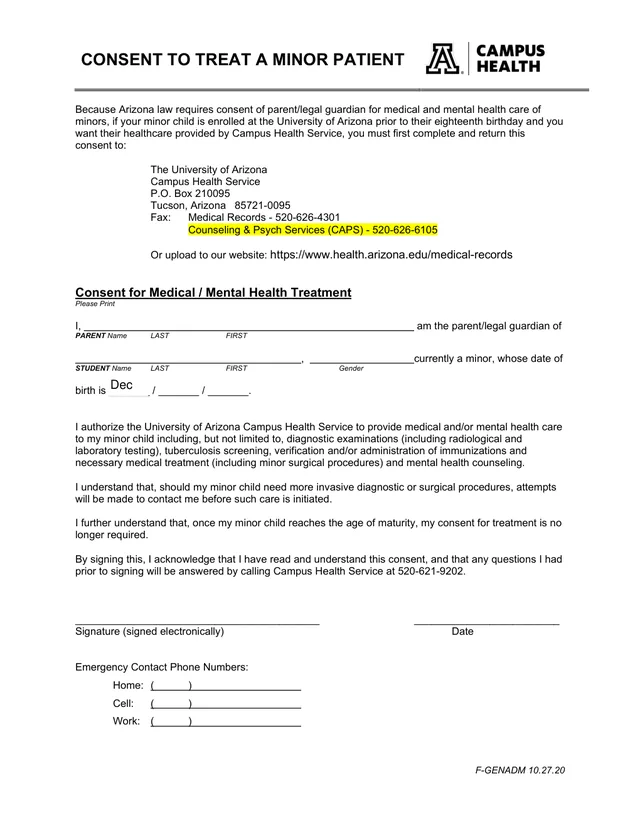
Because Arizona law requires consent of parent/legal guardian for medical and mental health care of minors, if your minor child is enrolled at the University of Arizona prior to their eighteenth birthday and you want their healthcare provided by Campus Health Service, you must first complete and return this consent to:
The University of Arizona
Campus Health Service
P.O. Box 210095
Tucson, Arizona 85721-0095
Fax:
Medical Records - 520-626-4301
Counseling & Psych Services (CAPS) - 520-626-6105
Or upload to our website: https://www.health.arizona.edu/medical-records
Consent for Medical / Mental Health Treatment
Please Print
I, am the parent/legal guardian of
PARENT Name
LAST
FIRST
, currently a minor, whose date of
STUDENT Name
LAST
FIRST
Gender birth is _______ / _______ / _______.
I authorize the University of Arizona Campus Health Service to provide medical and/or mental health care to my minor child including, but not limited to, diagnostic examinations (including radiological and laboratory testing), tuberculosis screening, verification and/or administration of immunizations and necessary medical treatment (including minor surgical procedures) and mental health
How to fill it
Fill or edit this form in MePDF
- Preview page 1 to confirm the form name and revision.
- Select Fill form to answer the form one page at a time.
- Type an answer for each field; checkboxes and choices use the form’s own options.
- Preview the finished pages, then download the flattened PDF.
- The downloaded copy is image-only, so it cannot be edited as a form again.
Spell names exactly as they appear in the passport. The editor keeps the original layout while you fill the existing fields.