What's inside
Form content
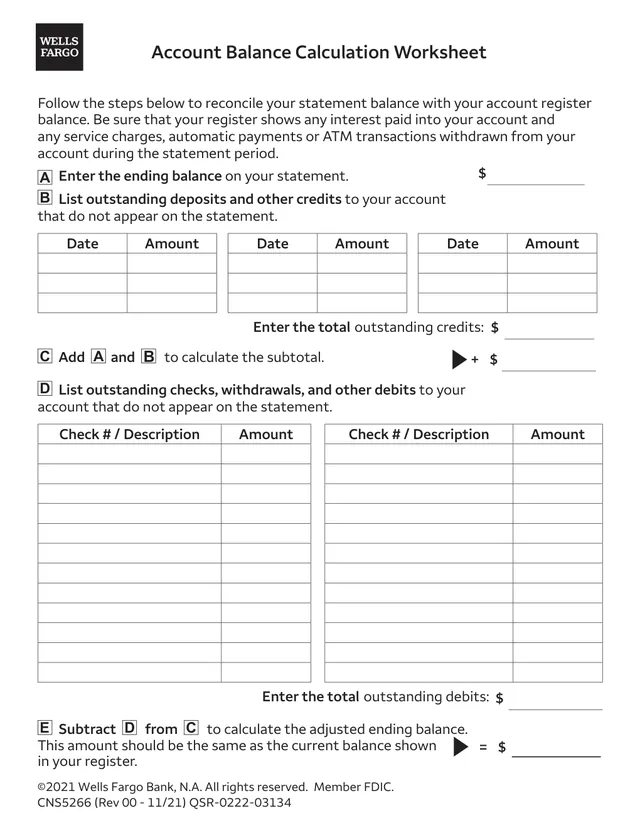
Account Balance Calculation Worksheet
Follow the steps below to reconcile your statement balance with your account register balance. Be sure that your register shows any interest paid into your account and any service charges, automatic payments or ATM transactions withdrawn from your account during the statement period.
A Enter the ending balance on your statement.
$
B List outstanding deposits and other credits to your account that do not appear on the statement.
Date
Amount
Date
Amount
Date
Amount
Enter the total outstanding credits: $
C Add A and B to calculate the subtotal.
+ $
D List outstanding checks, withdrawals, and other debits to your account that do not appear on the statement.
Check # / Description
Amount
Check # / Description
Amount
Enter the total outstanding debits: $
E Subtract D from C to calculate the adjusted ending balance.
This amount should be the same as the current balance shown in your register.
= $
©2021 Wells Fargo Bank, N.A. All rights reserved. Member FDIC.
CNS5266 (Rev 00 - 11/21) QSR-0222-03134
How to fill it
Fill or edit this form in MePDF
- Preview page 1 to confirm the form name and revision.
- Select Fill form to answer the form one page at a time.
- Type an answer for each field; checkboxes and choices use the form’s own options.
- Preview the finished pages, then download the flattened PDF.
- The downloaded copy is image-only, so it cannot be edited as a form again.
Copy figures exactly from the statement and keep the currency clear. The editor keeps the original layout while you fill the existing fields.