What's inside
Form content
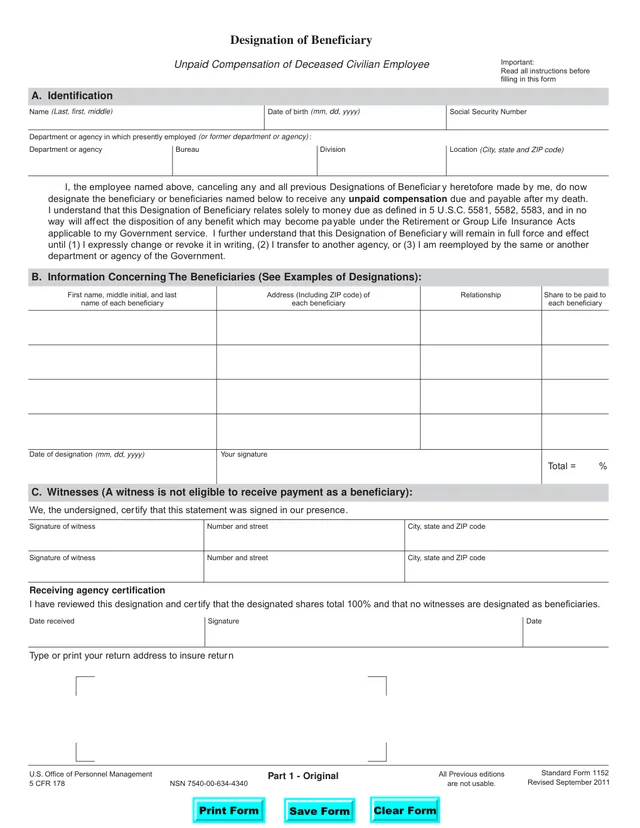
Designation of Beneficiary
Unpaid Compensation of Deceased Civilian Employee
Standard Form 1152
Revised September 2011
Important:
Read all instructions before filling in this form
A. Identification
Name (Last, first, middle)
Date of birth (mm, dd, yyyy)
Social Security Number
Department or agency in which presently employed (or former department or agency) :
Department or agency
Bureau
Division
Location (City, state and ZIP code)
I, the employee named above, canceling any and all previous Designations of Beneficiar y heretofore made by me, do now designate the beneficiary or beneficiaries named below to receive any unpaid compensation due and payable after my death.
I understand that this Designation of Beneficiary relates solely to money due as defined in 5 U.S.C. 5581, 5582, 5583, and in no way will affect the disposition of any benefit which may become payable under the Retirement or Group Life Insurance Acts applicable to my Government service. I further understand that this Designation of Beneficiary will remain in full force and effect until (1) I expressly change or revoke it in writing, (2) I transfer to another agency, or (3) I am reemployed by the same or another departme
How to fill it
Fill or edit this form in MePDF
- Preview page 1 to confirm the form name and revision.
- Select Fill form to answer the form one page at a time.
- Type an answer for each field; checkboxes and choices use the form’s own options.
- Preview the finished pages, then download the flattened PDF.
- The downloaded copy is image-only, so it cannot be edited as a form again.
Fill only the fields that apply and keep a copy of the finished PDF. The editor keeps the original layout while you fill the existing fields.