What's inside
Form content
I
I
STATE OF CALIFORNIA - HEALTH AND HUMAN SERVICES AGENCY
CALIFORNIA DEPARTMENT OF SOCIAL SERVICES
COMMUNITY CARE LICENSING
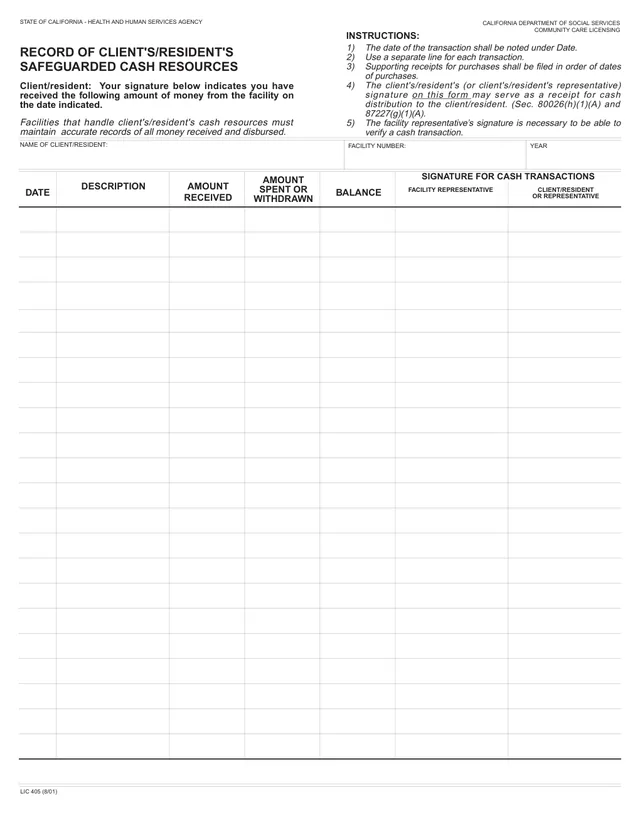
RECORD OF CLIENT'S/RESIDENT'S
SAFEGUARDED CASH RESOURCES
Client/resident: Your signature below indicates you have received the following amount of money from the facility on the date indicated.
Facilities that handle client's/resident's cash resources must maintain accurate records of all money received and disbursed.
INSTRUCTIONS:
1)
The date of the transaction shall be noted under Date.
2)
Use a separate line for each transaction.
3)
Supporting receipts for purchases shall be filed in order of dates of purchases.
4)
The client's/resident's (or client's/resident's representative) signature "start ital ics and underline" on this form "end italics and underline" may serve as a receipt for cash distribution to the client/resident. (Sec. 80026(h)(1)(A) and
87227(g)(1)(A).
5)
The facility representative’s signature is necessary to be able to verify a cash transaction.
NAME OF CLIENT/RESIDENT:
FACILITY NUMBER:
YEAR
DATE
DESCRIPTION
AMOUNT
RECEIVED
AMOUNT
SPENT OR
WITHDRAWN
BALANCE
SIGNATURE FOR CASH TRANSACTIONS
FACILITY REPRESENTATIVE
CLIENT/RESIDENT
OR REPRESENT
How to fill it
Fill or edit this form in MePDF
- Preview page 1 to confirm the form name and revision.
- Select Fill form to answer the form one page at a time.
- Type an answer for each field; checkboxes and choices use the form’s own options.
- Preview the finished pages, then download the flattened PDF.
- The downloaded copy is image-only, so it cannot be edited as a form again.
Fill only the fields that apply and keep a copy of the finished PDF. The editor keeps the original layout while you fill the existing fields.