What's inside
Form content
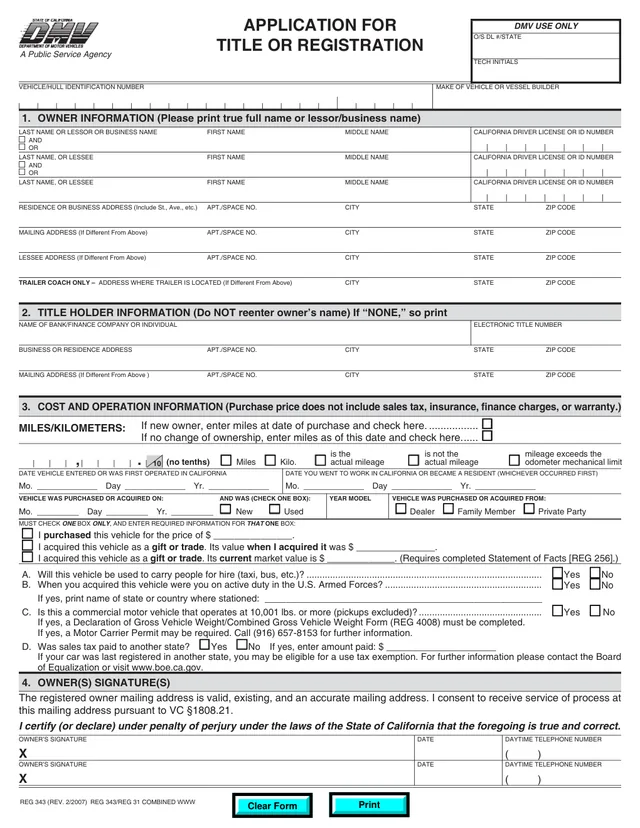
1. OWNER INFORMATION (Please print true full name or lessor/business name)
2. TITLE HOLDER INFORMATION (Do NOT reenter owner’s name) If “NONE,” so print
3. COST AND OPERATION INFORMATION (Purchase price does not include sales tax, insurance, fi nance charges, or warranty.)
4. OWNER(S) SIGNATURE(S)
DATE VEHICLE ENTERED OR WAS FIRST OPERATED IN CALIFORNIA
DATE YOU WENT TO WORK IN CALIFORNIA OR BECAME A RESIDENT (WHICHEVER OCCURRED FIRST)
VEHICLE WAS PURCHASED OR ACQUIRED ON:
AND WAS (CHECK ONE BOX):
YEAR MODEL
VEHICLE WAS PURCHASED OR ACQUIRED FROM:
MUST CHECK ONE BOX ONLY, AND ENTER REQUIRED INFORMATION FOR THAT ONE BOX:
APPLICATION FOR
TITLE OR REGISTRATION
Mo. _____________ Day _____________ Yr. _____________
Mo. _____________ Day _____________ Yr. _____________
Mo. _________ Day _________ Yr. _________
New
Used
Dealer
Family Member
Private Party
X
( )
X
( )
LAST NAME OR LESSOR OR BUSINESS NAME
FIRST NAME
MIDDLE NAME
CALIFORNIA DRIVER LICENSE OR ID NUMBER
LAST NAME, OR LESSEE
FIRST NAME
MIDDLE NAME
CALIFORNIA DRIVER LICENSE OR ID NUMBER
LAST NAME, OR LESSEE
FIRST NAME
MIDDLE NAME
CALIFORNIA DRIVER LICENSE OR ID NUMBER
RESIDENCE OR BUSINESS ADDRESS (Include St., Ave., etc.)
APT./SPA
How to fill it
Fill or edit this form in MePDF
- Preview page 1 to confirm the form name and revision.
- Select Fill form to answer the form one page at a time.
- Type an answer for each field; checkboxes and choices use the form’s own options.
- Preview the finished pages, then download the flattened PDF.
- The downloaded copy is image-only, so it cannot be edited as a form again.
Fill only the fields that apply and keep a copy of the finished PDF. The editor keeps the original layout while you fill the existing fields.