What's inside
Form content
3/09
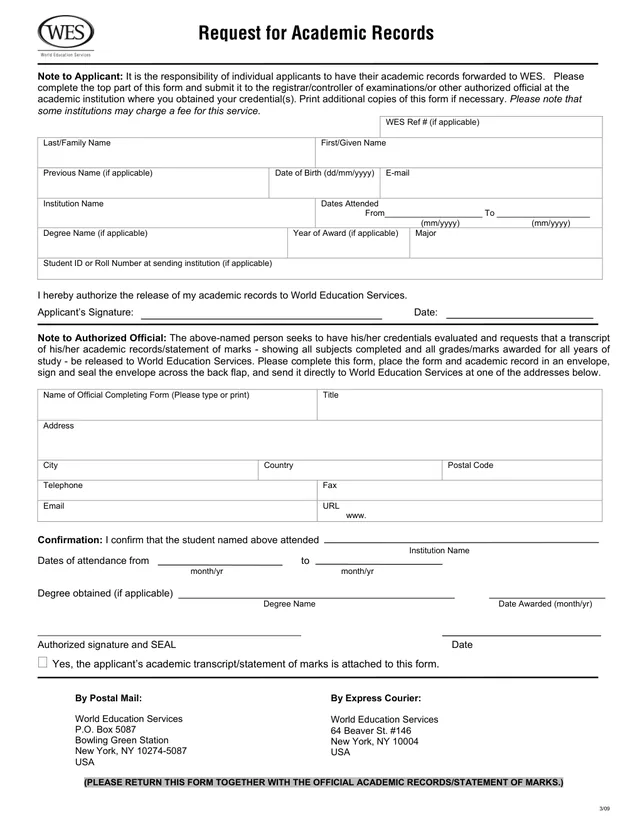
Request for Academic Records
Note to Applicant: It is the responsibility of individual applicants to have their academic records forwarded to WES. Please complete the top part of this form and submit it to the registrar/controller of examinations/or other authorized official at the academic institution where you obtained your credential(s). Print additional copies of this form if necessary. Please note that some institutions may charge a fee for this service.
WES Ref # (if applicable)
Last/Family Name
First/Given Name
Previous Name (if applicable)
Date of Birth (dd/mm/yyyy)
E-mail
Institution Name
Dates Attended
From_____________________ To ____________________
(mm/yyyy) (mm/yyyy)
Degree Name (if applicable)
Year of Award (if applicable)
Major
Student ID or Roll Number at sending institution (if applicable)
I hereby authorize the release of my academic records to World Education Services.
Applicant’s Signature:
Date:
Note to Authorized Official: The above-named person seeks to have his/her credentials evaluated and requests that a transcript of his/her academic records/statement of marks - showing all subjects completed and all grades/marks awarded for all years of study - be
How to fill it
Fill or edit this form in MePDF
- Preview page 1 to confirm the form name and revision.
- Select Fill form to answer the form one page at a time.
- Type an answer for each field; checkboxes and choices use the form’s own options.
- Preview the finished pages, then download the flattened PDF.
- The downloaded copy is image-only, so it cannot be edited as a form again.
Fill only the fields that apply and keep a copy of the finished PDF. The editor keeps the original layout while you fill the existing fields.