What's inside
Form content
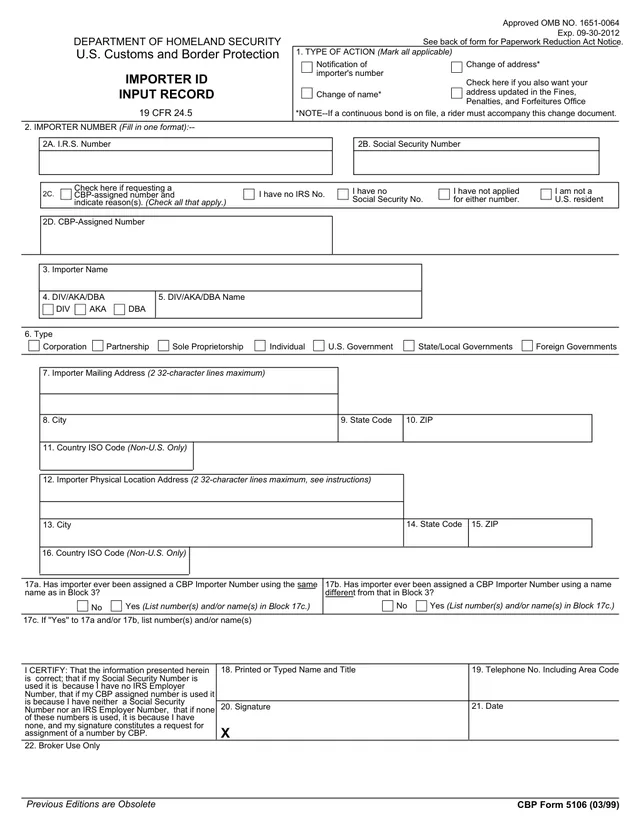
IMPORTER ID
INPUT RECORD
Approved OMB NO. 1651-0064
Exp. 09-30-2012
See back of form for Paperwork Reduction Act Notice.
1. TYPE OF ACTION (Mark all applicable)
Notification of importer's number
Change of address*
Check here if you also want your address updated in the Fines,
Penalties, and Forfeitures Office
Change of name*
*NOTE--If a continuous bond is on file, a rider must accompany this change document.
19 CFR 24.5
2. IMPORTER NUMBER (Fill in one format):--
2A. I.R.S. Number
2B. Social Security Number
Check here if requesting a
CBP-assigned number and indicate reason(s). (Check all that apply.)
I have no
Social Security No.
I have not applied for either number.
I am not a
U.S. resident
2C.
I have no IRS No.
2D. CBP-Assigned Number
3. Importer Name
5. DIV/AKA/DBA Name
4. DIV/AKA/DBA
6. Type
Corporation
7. Importer Mailing Address (2 32-character lines maximum)
10. ZIP
9. State Code
8. City
11. Country ISO Code (Non-U.S. Only)
12. Importer Physical Location Address (2 32-character lines maximum, see instructions)
15. ZIP
14. State Code
13. City
16. Country ISO Code (Non-U.S. Only)
17a. Has importer ever been assigned a CBP Importer Number using the same name as in Block 3?
17b.
How to fill it
Fill or edit this form in MePDF
- Preview page 1 to confirm the form name and revision.
- Select Fill form to answer the form one page at a time.
- Type an answer for each field; checkboxes and choices use the form’s own options.
- Preview the finished pages, then download the flattened PDF.
- The downloaded copy is image-only, so it cannot be edited as a form again.
Fill only the fields that apply and keep a copy of the finished PDF. The editor keeps the original layout while you fill the existing fields.