What's inside
Form content
Cash Receipt
Document Overview:
The Cash Receipt (CR) document is used to deposit cash or checks. The Cash Receipt document is completed based on the amount that needs to be deposited. Once submitted it routes to the Cashiers for approval. When the checks and/or cash is brought to the Cashier’s Office the document number is also given and if the amounts match then the cashier approves the Kuali document and revenue is deposited into the account. Expense object codes are allowed in the CR document. Cash object code will be recorded as a debit and the revenue/expense object codes are used to record the credit balance.
How to Complete the Document:
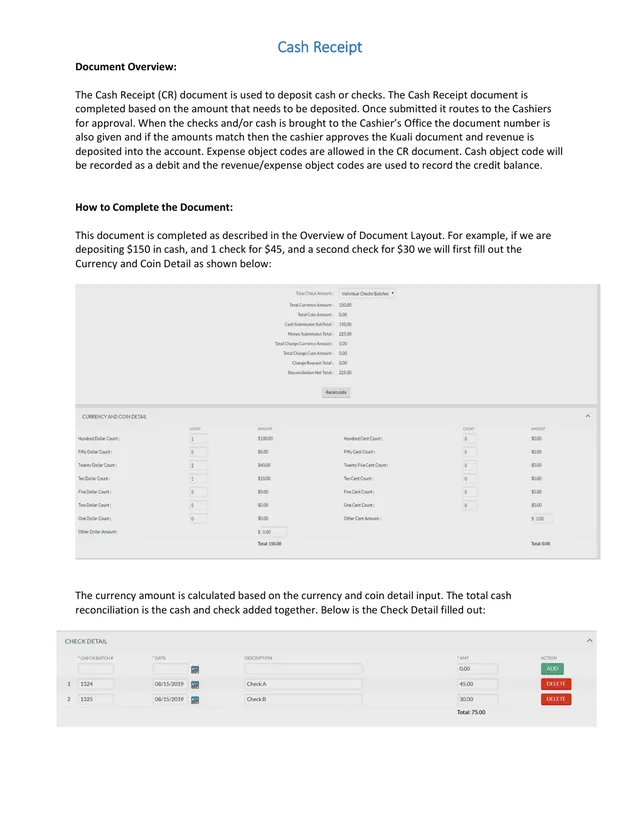
This document is completed as described in the Overview of Document Layout. For example, if we are depositing $150 in cash, and 1 check for $45, and a second check for $30 we will first fill out the
Currency and Coin Detail as shown below:
The currency amount is calculated based on the currency and coin detail input. The total cash reconciliation is the cash and check added together. Below is the Check Detail filled out:
Once the above information is entered, account number and object code needs to be entered where this amount will be depos
How to fill it
Fill or edit this form in MePDF
- Preview page 1 to confirm the form name and revision.
- This PDF has no interactive fields, so the fill wizard cannot ask for answers.
- Use the page preview to check the form, then download or print it from the issuing agency.
Copy figures exactly from the statement and keep the currency clear. Add only the fields the form needs, then flatten the copy when you export.