What's inside
Form content
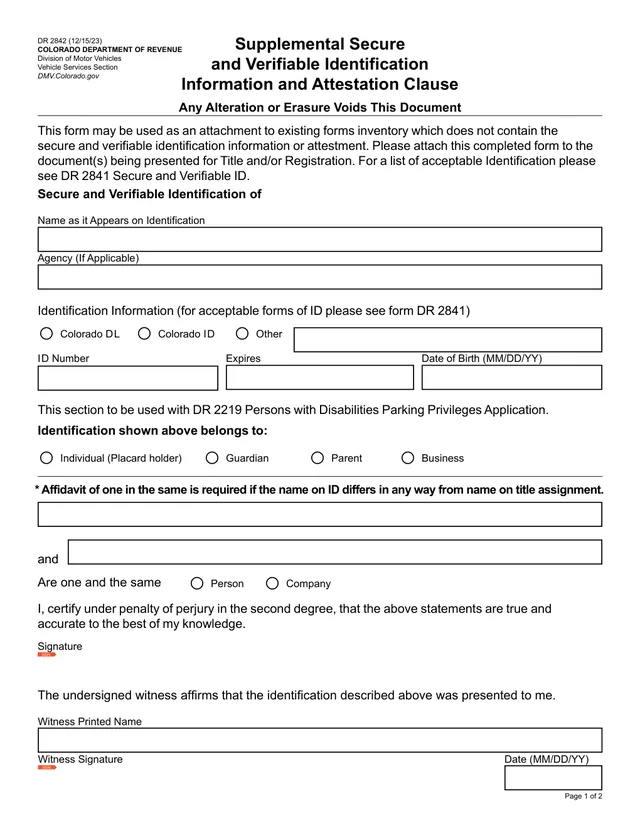
DR 2842 (12/15/23)
COLORADO DEPARTMENT OF REVENUE
Division of Motor Vehicles
Vehicle Services Section
DMV.Colorado.gov
Supplemental Secure and Verifiable Identification
Information and Attestation Clause
Any Alteration or Erasure Voids This Document
This form may be used as an attachment to existing forms inventory which does not contain the secure and verifiable identification information or attestment. Please attach this completed form to the document(s) being presented for Title and/or Registration. For a list of acceptable Identification please see DR 2841 Secure and Verifiable ID.
Secure and Verifiable Identification of
Name as it Appears on Identification
Agency (If Applicable)
Identification Information (for acceptable forms of ID please see form DR 2841)
Colorado D L
Colorado I D
Other
I D Number
Expires
Date of Birth (MM/DD/YY)
This section to be used with DR 2219 Persons with Disabilities Parking Privileges Application.
Identification shown above belongs to:
Individual (Placard holder)
Guardian
Parent
Business
* Affidavit of one in the same is required if the name on ID differs in any way from name on title assignment.
and
Are one and the same
Person
Company
I, certify un
How to fill it
Fill or edit this form in MePDF
- Preview page 1 to confirm the form name and revision.
- Select Fill form to answer the form one page at a time.
- Type an answer for each field; checkboxes and choices use the form’s own options.
- Preview the finished pages, then download the flattened PDF.
- The downloaded copy is image-only, so it cannot be edited as a form again.
Fill only the fields that apply and keep a copy of the finished PDF. The editor keeps the original layout while you fill the existing fields.