What's inside
Form content
Permission to Travel for Minors
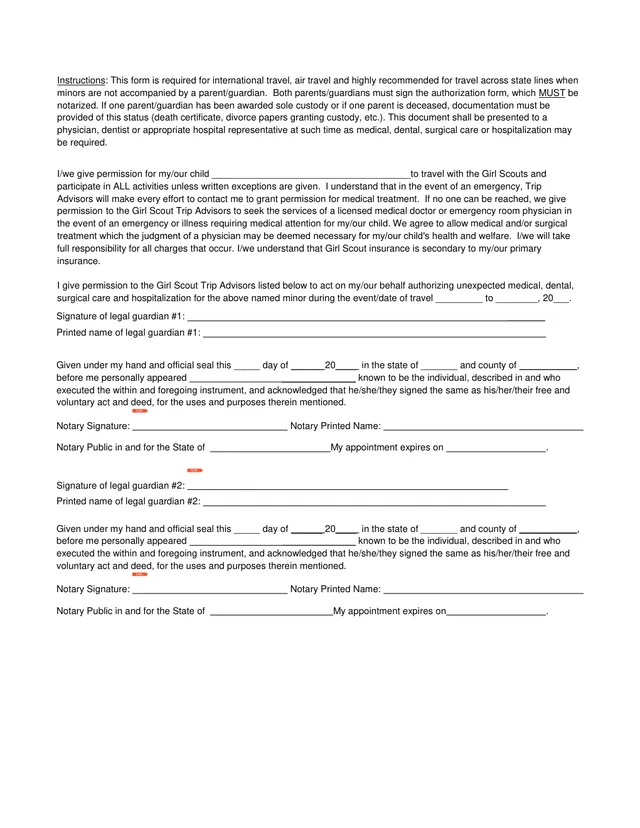
Instructions: This form is required for international travel, air travel and highly recommended for travel across state lines. Minors under the age of 18 traveling out of the state in which they reside and planning to cross state lines or travel to a foreign country, when not accompanied on the trip by parent(s), must have a notarized affidavit from the parent(s) not accompanying the child that:
1.
The child is traveling across state lines or out of the United States with the permission of the parent(s).
2.
That the non-traveling parent(s) is aware that the child is leaving on the departure dates.
3.
The name(s) of the person(s) accompanying the child are provided on the affidavit.
4.
If the minor child is crossing state lines or leaving the country without either of his/her parent(s), both parent(s) must sign and notarize the affidavit. If the parents do not reside together, parent consent from both parents is still necessary. If one parent is the custodial parent or deceased, there must be legal proof/documentation attached to this form.
I/we give permission for my/our child, _____________________ to travel to ____________________with the Girl Scou
How to fill it
Fill or edit this form in MePDF
- Preview page 2 to confirm the form name and revision.
- Select Fill form to answer the form one page at a time.
- Type an answer for each field; checkboxes and choices use the form’s own options.
- Preview the finished pages, then download the flattened PDF.
- The downloaded copy is image-only, so it cannot be edited as a form again.
Spell names exactly as they appear in the passport. The editor keeps the original layout while you fill the existing fields.