What's inside
Form content
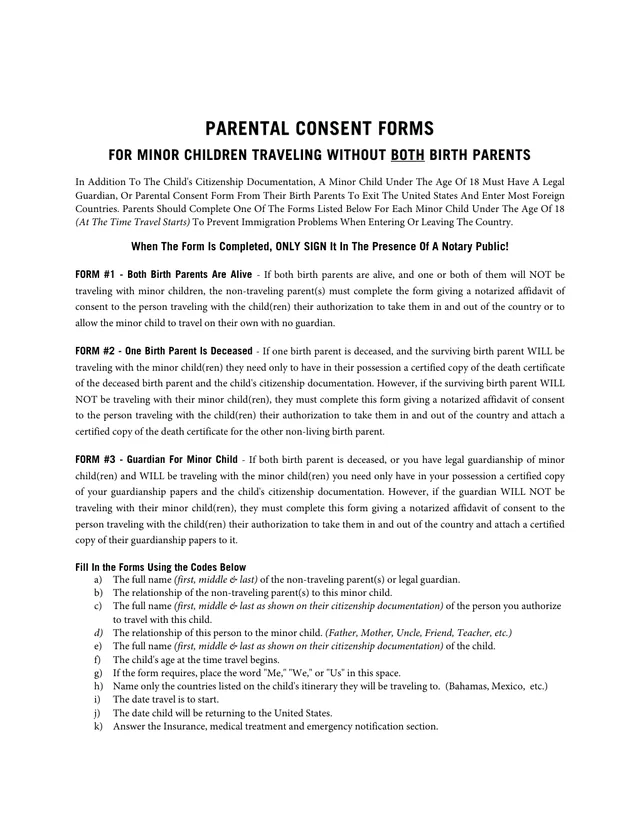
PARENTAL CONSENT FORMS
FOR MINOR CHILDREN TRAVELING WITHOUT BOTH BIRTH PARENTS
In Addition To The Child's Citizenship Documentation, A Minor Child Under The Age Of 18 Must Have A Legal
Guardian, Or Parental Consent Form From Their Birth Parents To Exit The United States And Enter Most Foreign
Countries. Parents Should Complete One Of The Forms Listed Below For Each Minor Child Under The Age Of 18
(At The Time Travel Starts) To Prevent Immigration Problems When Entering Or Leaving The Country.
When The Form Is Completed, ONLY SIGN It In The Presence Of A Notary Public!
FORM #1 - Both Birth Parents Are Alive - If both birth parents are alive, and one or both of them will NOT be traveling with minor children, the non-traveling parent(s) must complete the form giving a notarized affidavit of consent to the person traveling with the child(ren) their authorization to take them in and out of the country or to allow the minor child to travel on their own with no guardian.
FORM #2 - One Birth Parent Is Deceased - If one birth parent is deceased, and the surviving birth parent WILL be traveling with the minor child(ren) they need only to have in their possession a certified copy of the death
How to fill it
Fill or edit this form in MePDF
- Preview page 1 to confirm the form name and revision.
- This PDF has no interactive fields, so the fill wizard cannot ask for answers.
- Use the page preview to check the form, then download or print it from the issuing agency.
Spell names exactly as they appear in the passport. Add only the fields the form needs, then flatten the copy when you export.