What's inside
Form content
DA Form Revised April 2021 - #207
DIRECT DEPOSIT
FORM
Name of Financial Institution:
_________________________________________
Account Number:
_________________________________________
Continue additional deposits
-or-
Stop additional deposits and deposit all monies into the above account this account.
-or- monies going to accounts listed.
INCORRECT ROUTING AND/OR ACCOUNT NUMBERS WILL RESULT IN YOUR DIRECT DEPOSIT BEING DELAYED UNTIL THE
NEXT SCHEDULED PENSION PAYMENT.
Deposit Net Mont hly Pensi on Amount into
Use this account a s primar y with addi tional
Routing Number (9 Digits):
_______________________________________
Account Type: Checking Savings
Name of Financial Institution:
_________________________________________
Account Number:
_________________________________________
*** STOP and SIGN the bottom of this form if the above account is the ONLY deposit account. ***
If you wish to have specific dollar amounts deposited into additional account(s), please continue.
Ac count Type: Checking Savings
Deposit Amount: $__________________
Routing Number (9 Digits):
_____________________________________________________
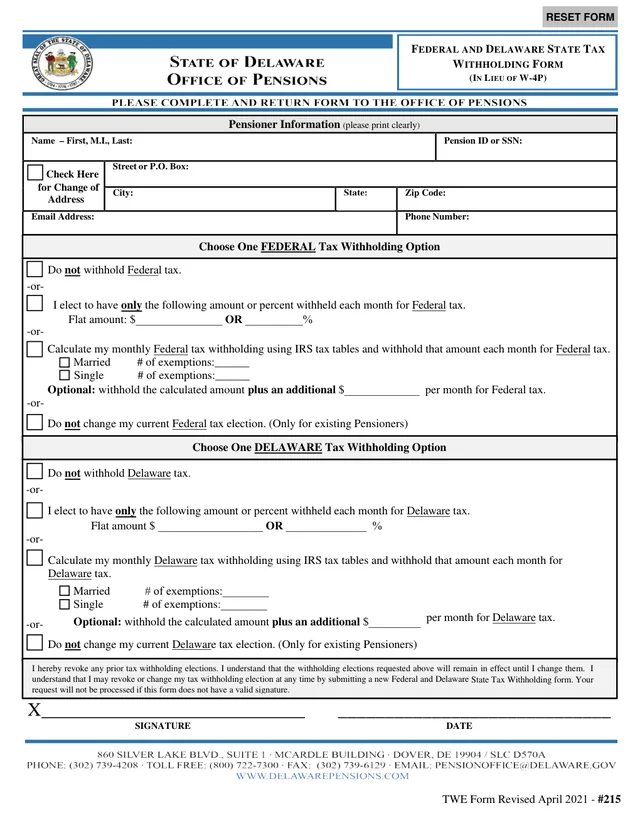
Pensioner Information (please print clearly)
Name – First, M.I.,
How to fill it
Fill or edit this form in MePDF
- Preview page 3 to confirm the form name and revision.
- Select Fill form to answer the form one page at a time.
- Type an answer for each field; checkboxes and choices use the form’s own options.
- Preview the finished pages, then download the flattened PDF.
- The downloaded copy is image-only, so it cannot be edited as a form again.
Match the employer's legal name and the employee's tax details. The editor keeps the original layout while you fill the existing fields.