What's inside
Form content
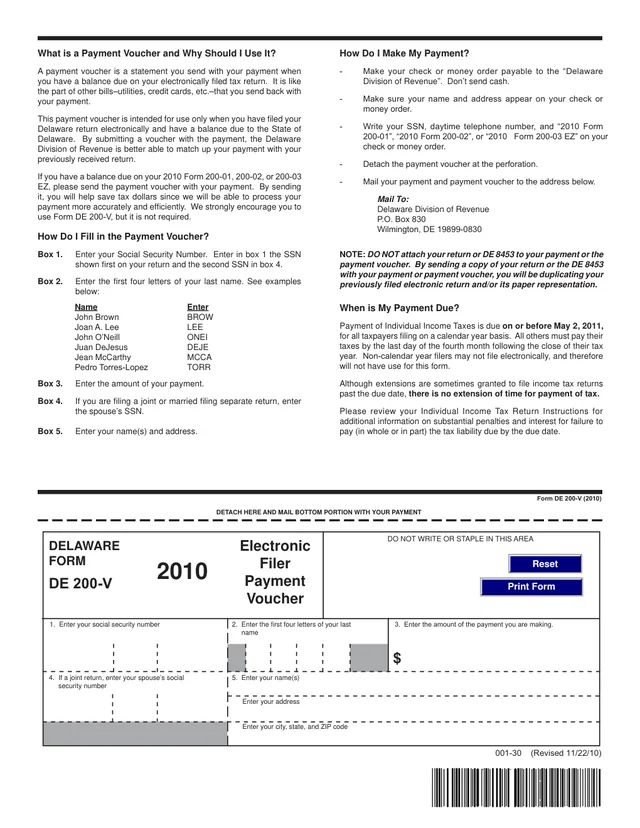
What is a Payment Voucher and Why Should I Use It?
A payment voucher is a statement you send with your payment when you have a balance due on your electronically fi led tax return. It is like the part of other bills–utilities, credit cards, etc.–that you send back with your payment.
This payment voucher is intended for use only when you have fi led your
Delaware return electronically and have a balance due to the State of
Delaware. By submitting a voucher with the payment, the Delaware
Division of Revenue is better able to match up your payment with your previously received return.
If you have a balance due on your 2010 Form 200-01, 200-02, or 200-03
EZ, please send the payment voucher with your payment. By sending it, you will help save tax dollars since we will be able to process your payment more accurately and effi ciently. We strongly encourage you to use Form DE 200-V, but it is not required.
How Do I Fill in the Payment Voucher?
Box 1. Enter your Social Security Number. Enter in box 1 the SSN shown fi rst on your return and the second SSN in box 4.
Box 2. Enter the fi rst four letters of your last name. See examples below:
Name
John Brown
Joan A. Lee
John O’Neill
Juan DeJesus
Jea
How to fill it
Fill or edit this form in MePDF
- Preview page 1 to confirm the form name and revision.
- Select Fill form to answer the form one page at a time.
- Type an answer for each field; checkboxes and choices use the form’s own options.
- Preview the finished pages, then download the flattened PDF.
- The downloaded copy is image-only, so it cannot be edited as a form again.
Keep the tax year and filing status consistent on every page. The editor keeps the original layout while you fill the existing fields.