What's inside
Form content
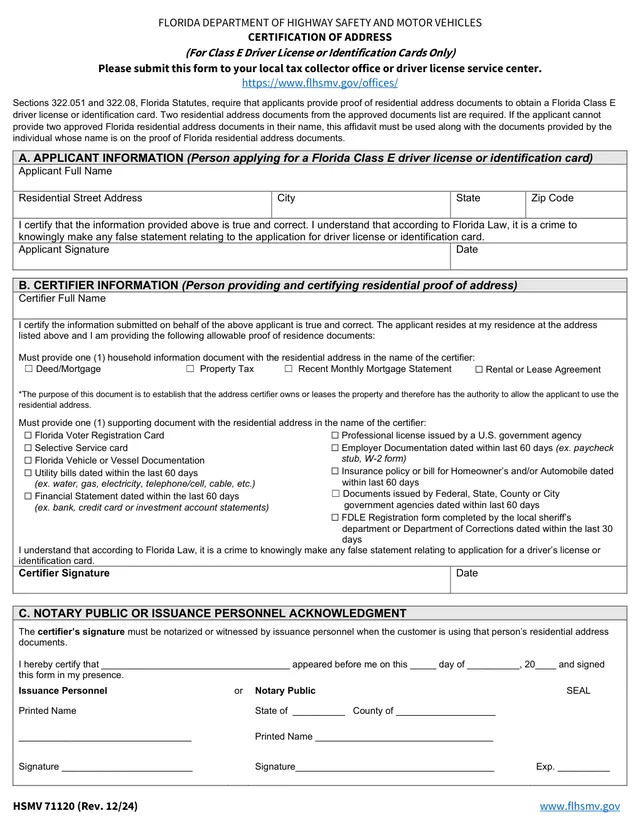
FLORIDA DEPARTMENT OF HIGHWAY SAFETY AND MOTOR VEHICLES
CERTIFICATION OF ADDRESS
(For Class E Driver License or Identification Cards Only)
Please submit this form to your local tax collector office or driver license service center.
https://www.flhsmv.gov/offices/
Sections 322.051 and 322.08, Florida Statutes, require that applicants provide proof of residential address documents to obtain a Florida Class E driver license or identification card. Two residential address documents from the approved documents list are required. If the applicant cannot provide two approved Florida residential address documents in their name, this affidavit must be used along with the documents provided by the individual whose name is on the proof of Florida residential address documents.
A. APPLICANT INFORMATION (Person applying for a Florida Class E driver license or identification card)
Applicant Full Name
Residential Street Address
City
State
Zip Code
I certify that the information provided above is true and correct. I understand that according to Florida Law, it is a crime to knowingly make any false statement relating to the application for driver license or identification card.
Applicant Signature
How to fill it
Fill or edit this form in MePDF
- Preview page 1 to confirm the form name and revision.
- Select Fill form to answer the form one page at a time.
- Type an answer for each field; checkboxes and choices use the form’s own options.
- Preview the finished pages, then download the flattened PDF.
- The downloaded copy is image-only, so it cannot be edited as a form again.
Fill only the fields that apply and keep a copy of the finished PDF. The editor keeps the original layout while you fill the existing fields.