What's inside
Form content
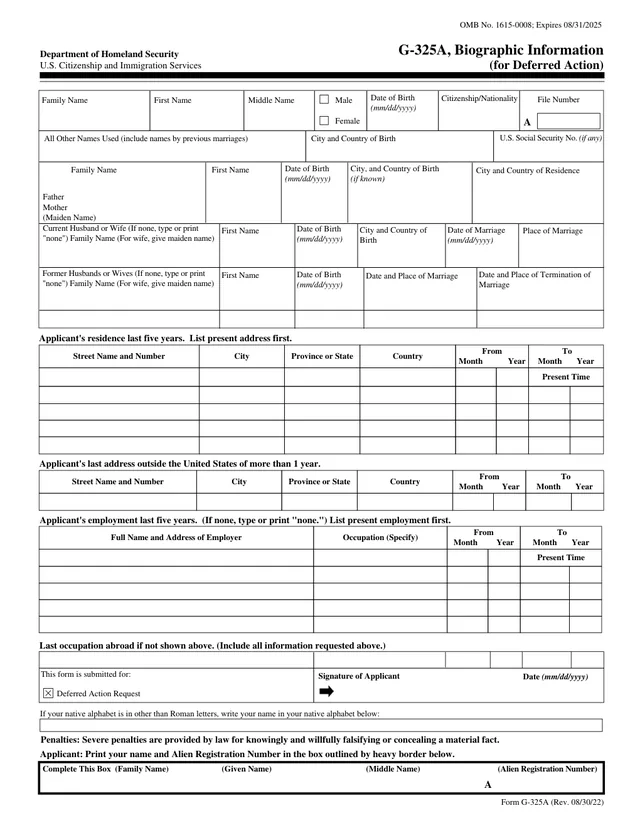
G-325A, Biographic Information
(for Deferred Action)
Family Name
First Name
File Number
Citizenship/Nationality
Middle Name
Date of Birth
(mm/dd/yyyy)
A
Department of Homeland Security
U.S. Citizenship and Immigration Services
All Other Names Used (include names by previous marriages)
U.S. Social Security No. (if any)
City and Country of Birth
Family Name
First Name
City, and Country of Birth
(if known)
Father
Mother
(Maiden Name)
City and Country of Residence
Current Husband or Wife (If none, type or print
"none") Family Name (For wife, give maiden name)
Date of Birth
(mm/dd/yyyy)
First Name
City and Country of
Birth
Date of Marriage
(mm/dd/yyyy)
Place of Marriage
Applicant's residence last five years. List present address first.
Street Name and Number
City
Province or State
Country
From
Month Year
To
Month Year
Present Time
Applicant's last address outside the United States of more than 1 year.
Street Name and Number
City
Province or State
Country
From
Month Year
To
Month Year
Full Name and Address of Employer
Occupation (Specify)
From
Month Year
To
Month Year
Present Time
Applicant's employment last five years. (If none, type or print "none.") List present employment first.
If y
How to fill it
Fill or edit this form in MePDF
- Preview page 1 to confirm the form name and revision.
- Select Fill form to answer the form one page at a time.
- Type an answer for each field; checkboxes and choices use the form’s own options.
- Preview the finished pages, then download the flattened PDF.
- The downloaded copy is image-only, so it cannot be edited as a form again.
Fill only the fields that apply and keep a copy of the finished PDF. The editor keeps the original layout while you fill the existing fields.