What's inside
Form content
Form G-845 Edition 04/08/21
Verification Request
Department of Homeland Security
U.S. Citizenship and Immigration Services
USCIS
Expires 04/30/2024
Part 1. Information From the Registered Agency
Immigration Document Number
Applicant Information
1.a.
START HERE - Type or print in black ink.
►
NOTE: Only the Registered Agency should complete this information.
To: U.S. Citizenship and Immigration Services (USCIS)
Attn: USCIS SAVE Program Status Verification Office
Stamp, type, or print the name, address, and ZIP Code of the
Registered Agency. (Print clearly since USCIS may use agency address below with a No. 10 window envelope.)
Alien Registration Number (A-Number)
1.b.
Form I-94 Number (Arrival-Departure Record)
►
1.c.
Other Immigration Number
1.d.
Name or Form Number of Document Containing the
Other Immigration Number
6.
Student and Exchange Visitor Information System
(SEVIS) Number
3.
Case Verification Number
Documents Attached (Select all that apply)
8.a.
Photocopy of most recently issued immigration document attached. Ensure copies are legible and made from an original document. If the immigration document is printed on both sides, attach a copy of the front and back.
8.b.
Other
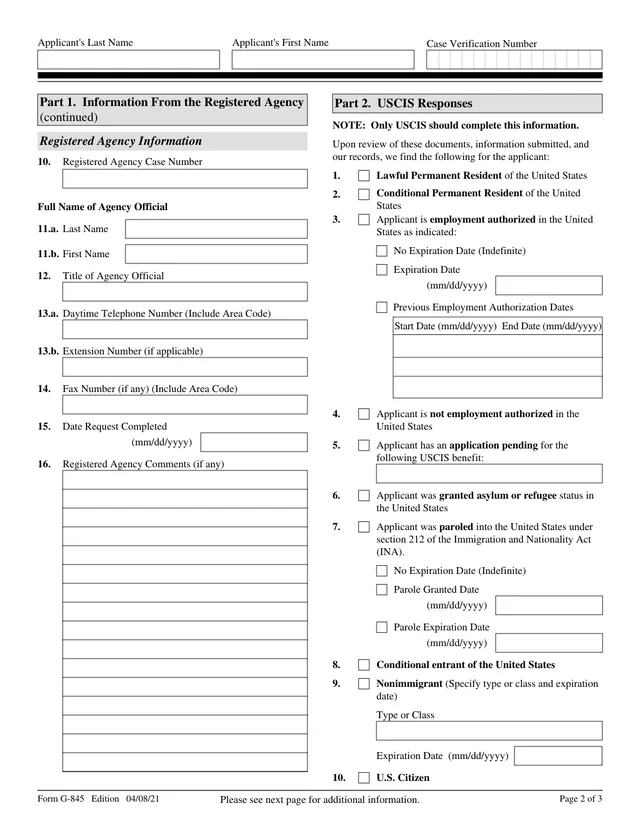
FieldsPart 1. Information From the Registered Agency. NOTE: Only the Registered Agency should complete this information. To: U.S. Citizenship and Immigration Services (U S C I S). Attention: U S C I S SAVE Program Status Verification Office. Stamp, type, or print the name, address, and ZIP Code of the Registered Agency. Print clearly since U S C I S may use agency address below with a Number 10 window envelope.Part 1. Information From the Registered Agency. Applicant Information. Immigration Document Number. 1. B. Enter Form I - 94 Number (Arrival-Departure Record).Part 1. Information From the Registered Agency. Applicant Information. Immigration Document Number. 1. C. Enter Other Immigration Number.Part 1. Information From the Registered Agency. Applicant Information. Immigration Document Number. 1. D. Enter Name or Form Number of Document Containing the Other Immigration Number.Part 1. Information From the Registered Agency. Applicant Information. 6. Enter Student and Exchange Visitor Information System (SEVIS) Number.Part 1. Information From the Registered Agency. Applicant Information. Documents Attached (Select all that apply). 8. A. Check this box for Photocopy of most recently issued immigration document attached. Ensure copies are legible and made from an original document. If the immigration document is printed on both sides, attach a copy of the front and back.Part 1. Information From the Registered Agency. Applicant Information. Documents Attached (Select all that apply). 8. B. Check this box for Other Information Attached (Specify Documents).Part 1. Information From the Registered Agency. Applicant Information. Documents Attached (Select all that apply). 8. B. If Other Information Attached is checked, Specify Documents.Part 1. Information From the Registered Agency. Applicant Information. Benefits Sought. 9. A. Check this box for Background Check.Part 1. Information From the Registered Agency. Applicant Information. Benefits Sought. 9. B. Check this box for Driver's License / I D.Part 1. Information From the Registered Agency. Applicant Information. Benefits Sought. 9. C. Check this box for Education Grant / Loan / Work Study.Part 1. Information From the Registered Agency. Applicant Information. Benefits Sought. 9. D. Check this box for Employment Authorization.