What's inside
Form content
D.
C.
B.
Under penalty of perjury, I declare that I have examined this return and to the best of my knowledge and belief it is true, correct and complete.
Print Name: _______________________________________ Title: ____________________________
C.
D.
B.
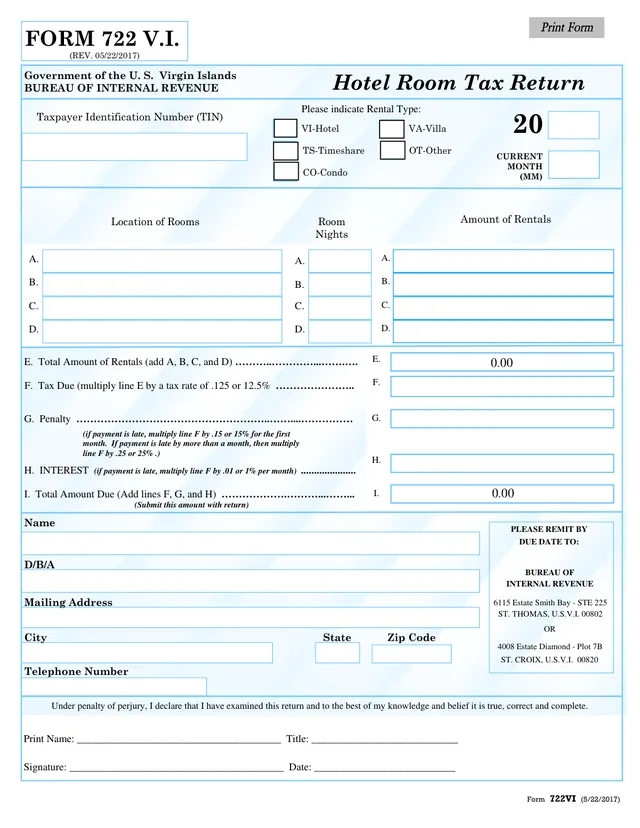
Government of the U. S. Virgin Islands
BUREAU OF INTERNAL REVENUE
Hotel Room Tax Return
20
FORM 722 V.I.
(REV. 05/22/2017)
D/B/A
Taxpayer Identification Number (TIN)
CURRENT
MONTH
(MM)
E. Total Amount of Rentals (add A, B, C, and D) ………..…………...…….….
F. Tax Due (multiply line E by a tax rate of .125 or 12.5% …………………..
A.
Signature: _________________________________________ Date: ___________________________
G. Penalty ………………………………………………..……....……………
H. INTEREST (if payment is late, multiply line F by .01 or 1% per month) .....................
I. Total Amount Due (Add lines F, G, and H) ……………….………...……...
(Submit this amount with return)
E.
F.
G.
H.
I.
Location of Rooms
Room
Nights
Amount of Rentals
A.
A.
B.
C.
D.
(if payment is late, multiply line F by .15 or 15% for the first month. If payment is late by more than a month, then multiply line F by .25 or 25% .)
Name
PLEASE REMIT BY
DUE DATE TO:
BUREAU OF
INTERNAL REVENUE
ST. CROIX, U.S
How to fill it
Fill or edit this form in MePDF
- Preview page 1 to confirm the form name and revision.
- Select Fill form to answer the form one page at a time.
- Type an answer for each field; checkboxes and choices use the form’s own options.
- Preview the finished pages, then download the flattened PDF.
- The downloaded copy is image-only, so it cannot be edited as a form again.
Keep the tax year and filing status consistent on every page. The editor keeps the original layout while you fill the existing fields.