What's inside
Form content
Form I-485 Supplement A Edition 02/21/23
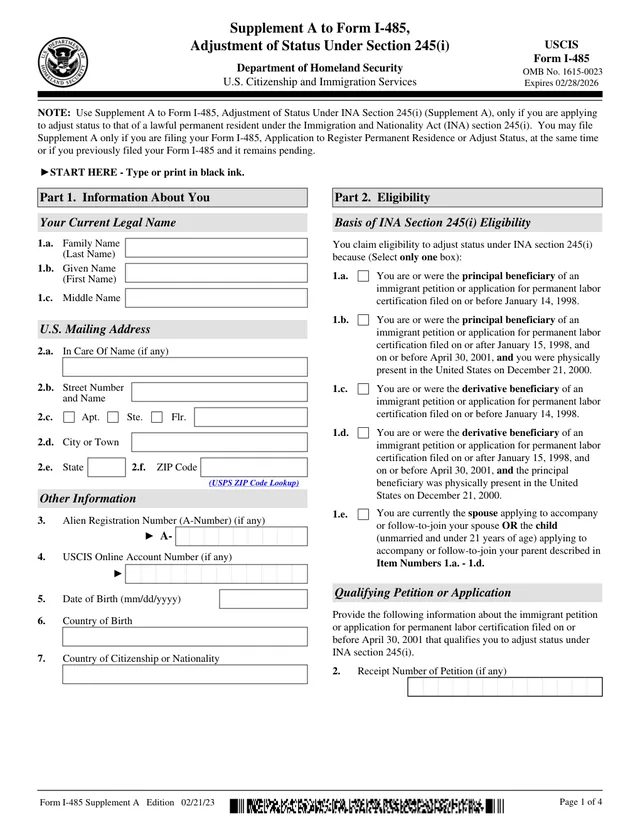
Supplement A to Form I-485,
Adjustment of Status Under Section 245(i)
Department of Homeland Security
U.S. Citizenship and Immigration Services
USCIS
Expires 02/28/2026
1.b.
1.c.
1.a.
Family Name
(Last Name)
Given Name
(First Name)
Middle Name
Your Current Legal Name
Part 1. Information About You
U.S. Mailing Address
NOTE: Use Supplement A to Form I-485, Adjustment of Status Under INA Section 245(i) (Supplement A), only if you are applying to adjust status to that of a lawful permanent resident under the Immigration and Nationality Act (INA) section 245(i). You may file
Supplement A only if you are filing your Form I-485, Application to Register Permanent Residence or Adjust Status, at the same time or if you previously filed your Form I-485 and it remains pending.
START HERE - Type or print in black ink.
►
City or Town
2.d.
ZIP Code
2.f.
State
2.e.
Street Number and Name
2.b.
2.c.
Apt.
Flr.
Ste.
2.a.
In Care Of Name (if any)
►A-
Alien Registration Number (A-Number) (if any)
3.
►
4.
USCIS Online Account Number (if any)
5.
Date of Birth (mm/dd/yyyy)
6.
Country of Birth
7.
Country of Citizenship or Nationality
You are or were the principal ben
How to fill it
Fill or edit this form in MePDF
- Preview page 1 to confirm the form name and revision.
- Select Fill form to answer the form one page at a time.
- Type an answer for each field; checkboxes and choices use the form’s own options.
- Preview the finished pages, then download the flattened PDF.
- The downloaded copy is image-only, so it cannot be edited as a form again.
Fill only the fields that apply and keep a copy of the finished PDF. The editor keeps the original layout while you fill the existing fields.