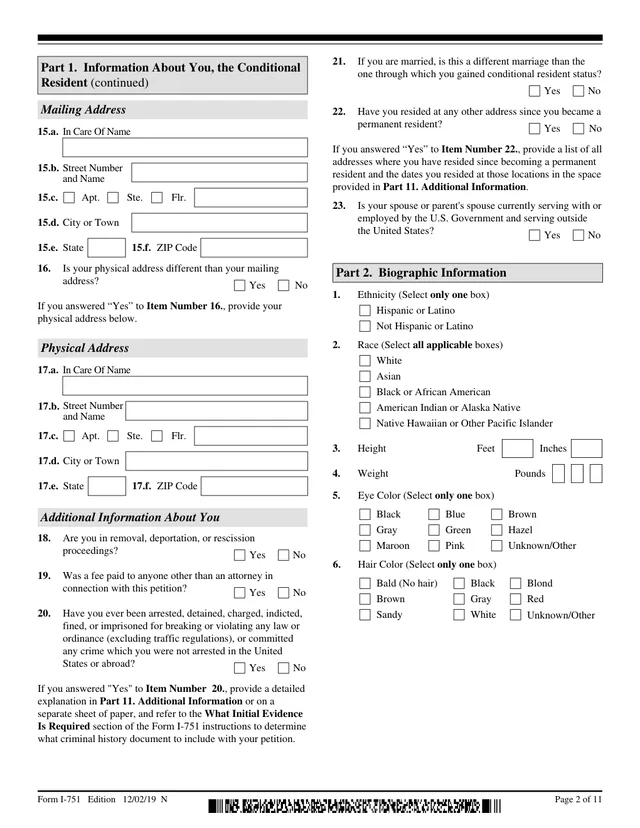
First page of i-751 Page 2 preview

Other · United States / General

i-751

Form I-751, Petition to Remove Conditions on Residence

0Views
0Downloads
11Pages
318Fields
Fill form

Form details

Category
Other
Country
United States / General
Pages
11
Fields
318
Type
Fillable PDF
Added
25 Nov 2026

What's inside

Form content

Form I-751 Edition 12/02/19 N
For
USCIS
Use
Only
Approved under INA 216(c)(4)(C) Battered Spouse/Child
Petition to Remove Conditions on Residence
Department of Homeland Security
U.S. Citizenship and Immigration Services
USCIS
Expires 12/31/2019
Receipt
Action Block
Remarks
Reloc Sent
Date (mm/dd/yyyy)
/ / /
Reloc Received
Date (mm/dd/yyyy)
/ / /
Date (mm/dd/yyyy)
/ / /
Date (mm/dd/yyyy)
/ / /
Petitioner interviewed on (mm/dd/yyyy) / / /
Select this box if
Form G-28 is attached.
Attorney State Bar Number
(if applicable)
Attorney or Accredited Representative
USCIS Online Account Number (if any)
To be completed by an attorney or accredited representative (if any).
START HERE - Type or print in black ink.
►
Part 1. Information About You, the Conditional
Resident
1.a.
Family Name
(Last Name)
1.b. Given Name
(First Name)
1.c. Middle Name
Other Names Used
2.a.
Family Name
(Last Name)
2.b. Given Name
(First Name)
2.c. Middle Name
3.a.
Family Name
(Last Name)
3.b.
Given Name
(First Name)
3.c.
Middle Name
4.
Date of Birth (mm/dd/yyyy)
10.
Marital Status
11.
Date of Marriage (mm/dd/yyyy)
12.
Place of Marriage
13.
If the marriage through which you gained conditional residence has ended, provid

FieldsTo be completed by an attorney or accredited representative, if any. Select this box if Form G - 28 is attached.To be completed by an attorney or accredited representative, if any. Enter Attorney State Bar Number, if applicable.To be completed by an attorney or accredited representative, if any. Enter Attorney or Accredited Representative U S C I S Electronic Immigration System (E L I S) Number, if any.Part 1. Information About You, the Conditional Resident. 1. A. Enter Family Name (Last Name).Part 1. Information About You, the Conditional Resident. 1. B. Enter Given Name (First Name).Part 1. Information About You, the Conditional Resident. 1. C. Enter Middle Name.Part 1. Information About You, the Conditional Resident. Other Names Used. List all other names you have ever used, including aliases, maiden name, and nicknames. If you need extra space to complete this section, use the space provided in Part 11. Additional Information. 2. A. Enter Family Name (Last Name).Part 1. Information About You, the Conditional Resident. Other Names Used. 2. B. Enter Given Name (First Name).Part 1. Information About You, the Conditional Resident. Other Names Used. 2. C. Enter Middle Name.Part 1. Information About You, the Conditional Resident. Other Names Used. 3. A. Enter Family Name (Last Name).Part 1. Information About You, the Conditional Resident. Other Names Used. 3. B. Enter Given Name (First Name).Part 1. Information About You, the Conditional Resident. Other Names Used. 3. C. Enter Middle Name.

How to fill it

Fill or edit this form in MePDF

  1. Preview page 2 to confirm the form name and revision.
  2. Select Fill form to answer the form one page at a time.
  3. Type an answer for each field; checkboxes and choices use the form’s own options.
  4. Preview the finished pages, then download the flattened PDF.
  5. The downloaded copy is image-only, so it cannot be edited as a form again.

Fill only the fields that apply and keep a copy of the finished PDF. The editor keeps the original layout while you fill the existing fields.