What's inside
Form content
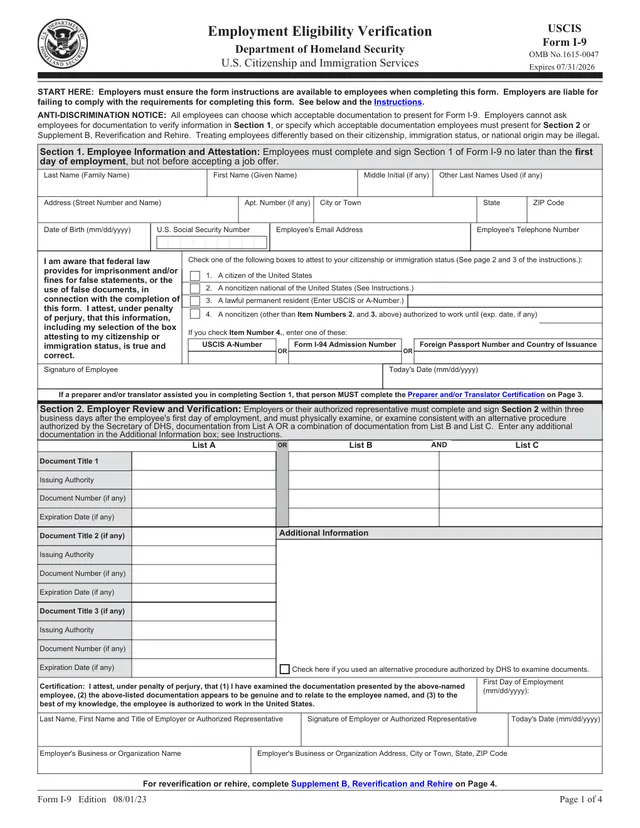
Employment Eligibility Verification
Department of Homeland Security
U.S. Citizenship and Immigration Services
USCIS
Expires 07/31/2026
START HERE: Employers must ensure the form instructions are available to employees when completing this form. Employers are liable for failing to comply with the requirements for completing this form. See below and the Instructions.
ANTI-DISCRIMINATION NOTICE: All employees can choose which acceptable documentation to present for Form I-9. Employers cannot ask employees for documentation to verify information in Section 1, or specify which acceptable documentation employees must present for Section 2 or
Supplement B, Reverification and Rehire. Treating employees differently based on their citizenship, immigration status, or national origin may be illegal.
Section 1. Employee Information and Attestation: Employees must complete and sign Section 1 of Form I-9 no later than the first day of employment, but not before accepting a job offer.
Last Name (Family Name)
First Name (Given Name)
Middle Initial (if any)
Other Last Names Used (if any)
Address (Street Number and Name)
Apt. Number (if any)
City or Town
State
ZIP Code
Date of Birth (mm/dd/yyyy)
U.S.
How to fill it
Fill or edit this form in MePDF
- Preview page 1 to confirm the form name and revision.
- Select Fill form to answer the form one page at a time.
- Type an answer for each field; checkboxes and choices use the form’s own options.
- Preview the finished pages, then download the flattened PDF.
- The downloaded copy is image-only, so it cannot be edited as a form again.
Fill only the fields that apply and keep a copy of the finished PDF. The editor keeps the original layout while you fill the existing fields.