What's inside
Form content
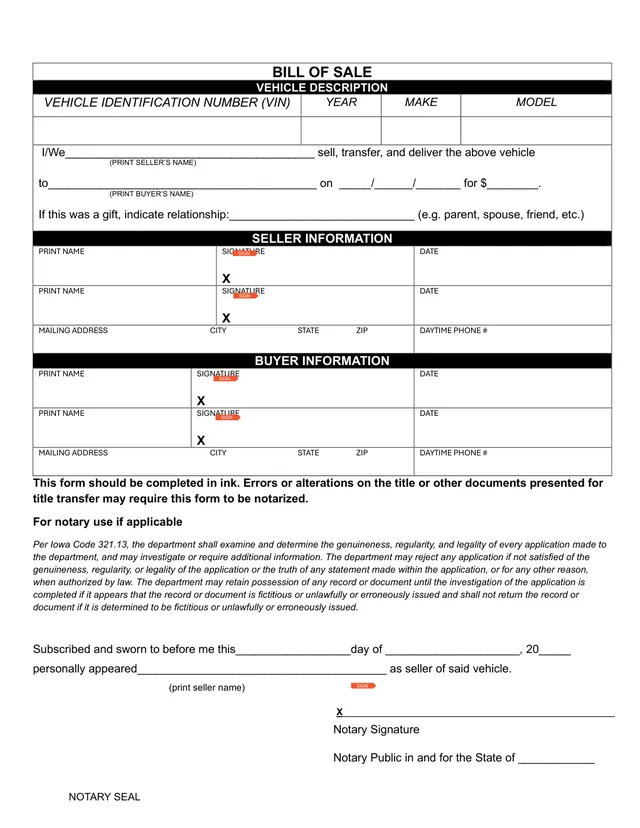
BILL OF SALE
VEHICLE DESCRIPTION
VEHICLE IDENTIFICATION NUMBER (VIN)
YEAR
MAKE
MODEL
I/We_______________________________________ sell, transfer, and deliver the above vehicle
(PRINT SELLER’S NAME) to__________________________________________ on _____/______/_______ for $________.
(PRINT BUYER’S NAME)
If this was a gift, indicate relationship:_____________________________ (e.g. parent, spouse, friend, etc.)
SELLER INFORMATION
PRINT NAME
SIGNATURE
X
DATE
PRINT NAME
SIGNATURE
X
DATE
MAILING ADDRESS CITY STATE ZIP
DAYTIME PHONE #
BUYER INFORMATION
PRINT NAME
SIGNATURE
X
DATE
PRINT NAME
SIGNATURE
X
DATE
MAILING ADDRESS CITY STATE ZIP
DAYTIME PHONE #
This form should be completed in ink. Errors or alterations on the title or other documents presented for title transfer may require this form to be notarized.
For notary use if applicable
Per Iowa Code 321.13, the department shall examine and determine the genuineness, regularity, and legality of every application made to the department, and may investigate or require additional information. The department may reject any application if not satisfied of the genuineness, regularity, or legality of the application or the truth of any statement
How to fill it
Fill or edit this form in MePDF
- Preview page 1 to confirm the form name and revision.
- Select Fill form to answer the form one page at a time.
- Type an answer for each field; checkboxes and choices use the form’s own options.
- Preview the finished pages, then download the flattened PDF.
- The downloaded copy is image-only, so it cannot be edited as a form again.
Copy figures exactly from the statement and keep the currency clear. The editor keeps the original layout while you fill the existing fields.