What's inside
Form content
EFO00307 04-28-2025
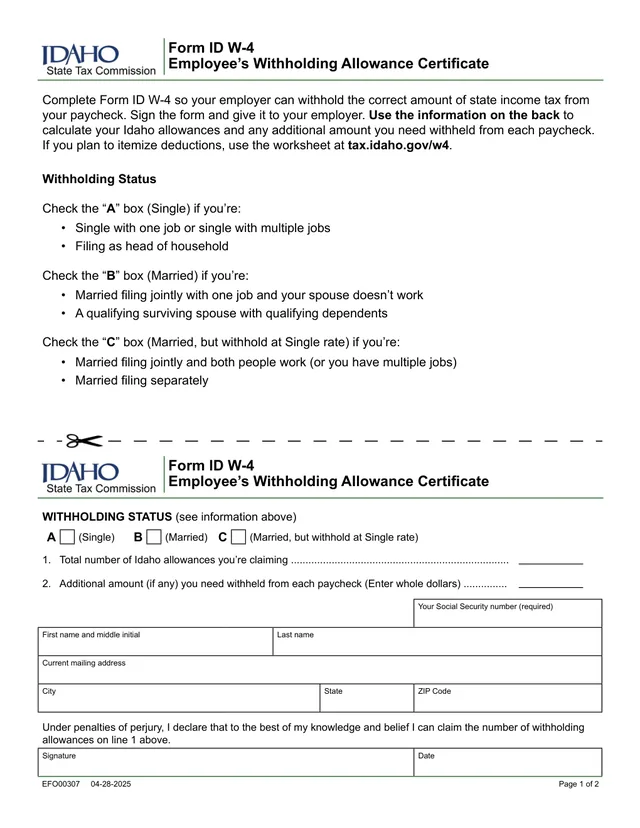
Form ID W-4
Employee’s Withholding Allowance Certificate
Complete Form ID W-4 so your employer can withhold the correct amount of state income tax from your paycheck. Sign the form and give it to your employer. Use the information on the back to calculate your Idaho allowances and any additional amount you need withheld from each paycheck.
If you plan to itemize deductions, use the worksheet at tax.idaho.gov/w4.
Withholding Status
Check the “A” box (Single) if you’re:
• Single with one job or single with multiple jobs
• Filing as head of household
Check the “B” box (Married) if you’re:
• Married filing jointly with one job and your spouse doesn’t work
• A qualifying surviving spouse with qualifying dependents
Check the “C” box (Married, but withhold at Single rate) if you’re:
• Married filing jointly and both people work (or you have multiple jobs)
• Married filing separately
Form ID W-4
Employee’s Withholding Allowance Certificate
WITHHOLDING STATUS (see information above)
A
(Single)
B
(Married)
C
(Married, but withhold at Single rate)
1.
Total number of Idaho allowances you’re claiming ...........................................................................
How to fill it
Fill or edit this form in MePDF
- Preview page 1 to confirm the form name and revision.
- Select Fill form to answer the form one page at a time.
- Type an answer for each field; checkboxes and choices use the form’s own options.
- Preview the finished pages, then download the flattened PDF.
- The downloaded copy is image-only, so it cannot be edited as a form again.
Keep the tax year and filing status consistent on every page. The editor keeps the original layout while you fill the existing fields.