What's inside
Form content
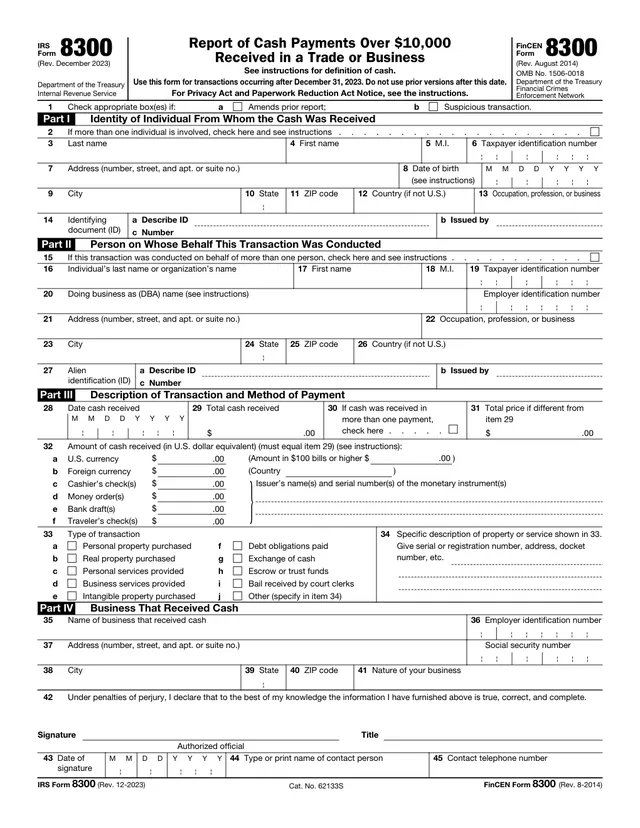
IRS
(Rev. December 2023)
Report of Cash Payments Over $10,000
Received in a Trade or Business
See instructions for definition of cash.
Use this form for transactions occurring after December 31, 2023. Do not use prior versions after this date.
For Privacy Act and Paperwork Reduction Act Notice, see the instructions.
FinCEN
(Rev. August 2014)
Financial Crimes
Enforcement Network
1
Check appropriate box(es) if:
a
Amends prior report;
b
Suspicious transaction.
Part I
Identity of Individual From Whom the Cash Was Received
2
If more than one individual is involved, check here and see instructions .
.
.
.
.
.
.
.
.
.
.
.
.
.
.
.
.
.
.
.
3 Last name
4 First name
5 M.I.
6 Taxpayer identification number
7 Address (number, street, and apt. or suite no.)
8 Date of birth
(see instructions)
M M D D Y Y Y Y
9 City
10 State
11 ZIP code
12 Country (if not U.S.)
13 Occupation, profession, or business
14 Identifying document (ID) a Describe ID b Issued by c Number
Part II
Person on Whose Behalf This Transaction Was Conducted
15
If this transaction was conducted on behalf of more than one person, check here and see instructions .
.
.
.
.
.
.
.
.
.
.
16 Individual’s last name or organization’s name
17
How to fill it
Fill or edit this form in MePDF
- Preview page 1 to confirm the form name and revision.
- Select Fill form to answer the form one page at a time.
- Type an answer for each field; checkboxes and choices use the form’s own options.
- Preview the finished pages, then download the flattened PDF.
- The downloaded copy is image-only, so it cannot be edited as a form again.
Keep the tax year and filing status consistent on every page. The editor keeps the original layout while you fill the existing fields.