What's inside
Form content
(Rev. October 2018)
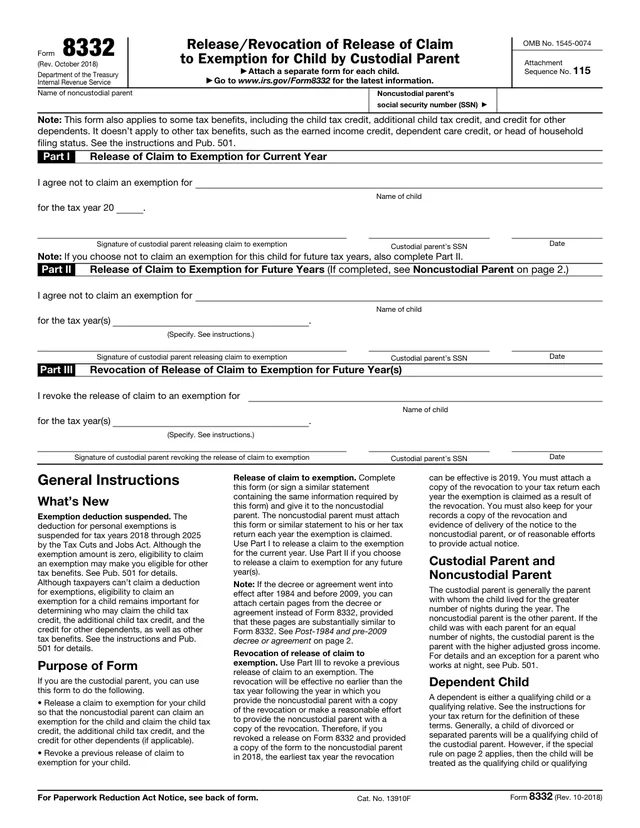
Release/Revocation of Release of Claim to Exemption for Child by Custodial Parent
▶ Attach a separate form for each child.
▶ Go to www.irs.gov/Form8332 for the latest information.
Attachment
Sequence No. 115
Name of noncustodial parent
Noncustodial parent’s social security number (SSN) ▶
Note: This form also applies to some tax benefits, including the child tax credit, additional child tax credit, and credit for other dependents. It doesn’t apply to other tax benefits, such as the earned income credit, dependent care credit, or head of household filing status. See the instructions and Pub. 501.
Part I
Release of Claim to Exemption for Current Year
I agree not to claim an exemption for
Name of child for the tax year 20
.
Signature of custodial parent releasing claim to exemption
Custodial parent’s SSN
Date
Note: If you choose not to claim an exemption for this child for future tax years, also complete Part II.
Part II
Release of Claim to Exemption for Future Years (If completed, see Noncustodial Parent on page 2.)
I agree not to claim an exemption for
Name of child for the tax year(s)
(Specify. See instructions.)
.
Signature of custodial parent releasing claim to
How to fill it
Fill or edit this form in MePDF
- Preview page 1 to confirm the form name and revision.
- Select Fill form to answer the form one page at a time.
- Type an answer for each field; checkboxes and choices use the form’s own options.
- Preview the finished pages, then download the flattened PDF.
- The downloaded copy is image-only, so it cannot be edited as a form again.
Keep the tax year and filing status consistent on every page. The editor keeps the original layout while you fill the existing fields.