What's inside
Form content
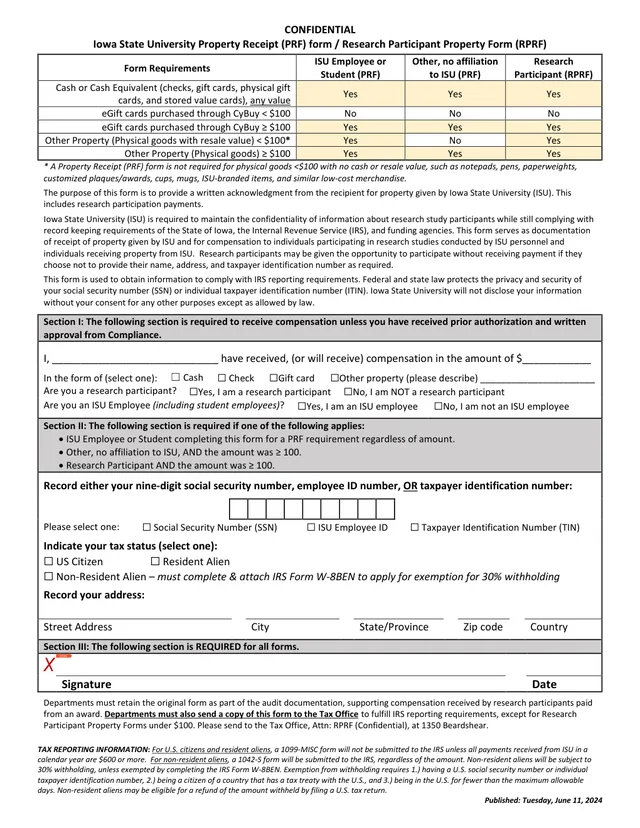
CONFIDENTIAL
Iowa State University Property Receipt (PRF) form / Research Participant Property Form (RPRF)
TAX REPORTING INFORMATION: For U.S. citizens and resident aliens, a 1099-MISC form will not be submitted to the IRS unless all payments received from ISU in a calendar year are $600 or more. For non-resident aliens, a 1042-S form will be submitted to the IRS, regardless of the amount. Non-resident aliens will be subject to
30% withholding, unless exempted by completing the IRS Form W-8BEN. Exemption from withholding requires 1.) having a U.S. social security number or individual taxpayer identification number, 2.) being a citizen of a country that has a tax treaty with the U.S., and 3.) being in the U.S. for fewer than the maximum allowable days. Non-resident aliens may be eligible for a refund of the amount withheld by filing a U.S. tax return.
Published: Tuesday, June 11, 2024
ISU Employee or
Student (PRF)
Other, no affiliation to ISU (PRF)
Research
Participant (RPRF)
Cash or Cash Equivalent (checks, gift cards, physical gift cards, and stored value cards), any value
Yes
Yes
Yes eGift cards purchased through CyBuy < $100
No
No
No eGift cards purchased through CyBuy ≥ $100
Ye
How to fill it
Fill or edit this form in MePDF
- Preview page 1 to confirm the form name and revision.
- Select Fill form to answer the form one page at a time.
- Type an answer for each field; checkboxes and choices use the form’s own options.
- Preview the finished pages, then download the flattened PDF.
- The downloaded copy is image-only, so it cannot be edited as a form again.
Copy figures exactly from the statement and keep the currency clear. The editor keeps the original layout while you fill the existing fields.