What's inside
Form content
記入上の注意
INSTRUCTIONS
1.タイプ、又は手書きでブロック体で明瞭に記入すること。
1. Type or write neatly by hand in block letters.
2.数字は算用数字を用いること。
2. Use Arabic numerals (0, 1, 2, 3, 4…).
3.年号はすべて西暦とすること。
3. Write years in western calendar.
4.固有名詞はすべて正式な名称とし、一切省略しないこと。
※パスポートの表記と同一にすること Write your name exactly as it appears on your passport.
2
0
※下記外務省ウェブページを参照し、国籍国に所在する公館の中から公館名を省略せずに1つ記載すること。不明な場合は在外公
館に確認すること。 記入例 在インド日本国大使館、在ムンバイ日本国総領事館 等
Write a Japanese diplomatic office in the country of your nationality in reference to the following webpage of the Ministry of Foreign Affairs. Do not omit country/ state/ province name. Please consult in advance with a Japanese diplomatic office if you are unsure about this item. e.g. Embassy of Japan in
India, Consulate-General of Japan in Mumbai etc.
Embassies & Consulates: https://www.mofa.go.jp/about/emb_cons/over/index.html
※渡日前住所が現住所から変更になることが確定している場合は、「(2)渡日前住所」の「下記住所に変更することが確定して
いる」に✔を入れ、住所を記入すること。変更がない場合は「同上」に✔を入れること。If the current address will be changed at the time of leaving from your country, please check the box of 'The above 'Current Address' will be changed as follows:' and specify the new address. If the current address will not be changed, check the box
How to fill it
Fill or edit this form in MePDF
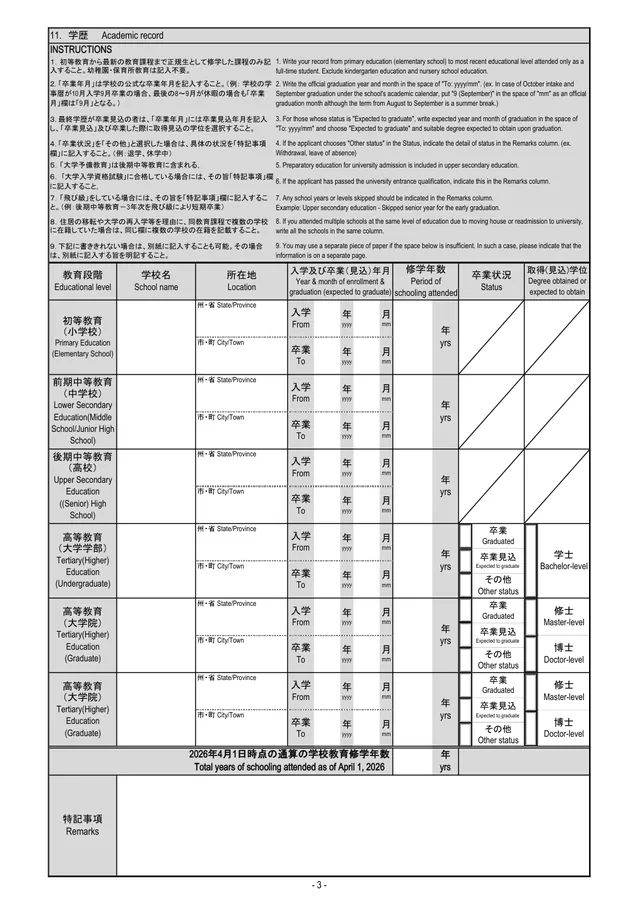
- Preview page 3 to confirm the form name and revision.
- Select Fill form to answer the form one page at a time.
- Type an answer for each field; checkboxes and choices use the form’s own options.
- Preview the finished pages, then download the flattened PDF.
- The downloaded copy is image-only, so it cannot be edited as a form again.
Fill only the fields that apply and keep a copy of the finished PDF. The editor keeps the original layout while you fill the existing fields.