What's inside
Form content
SG/LG/SAEmergencyMedicalConsent20100122
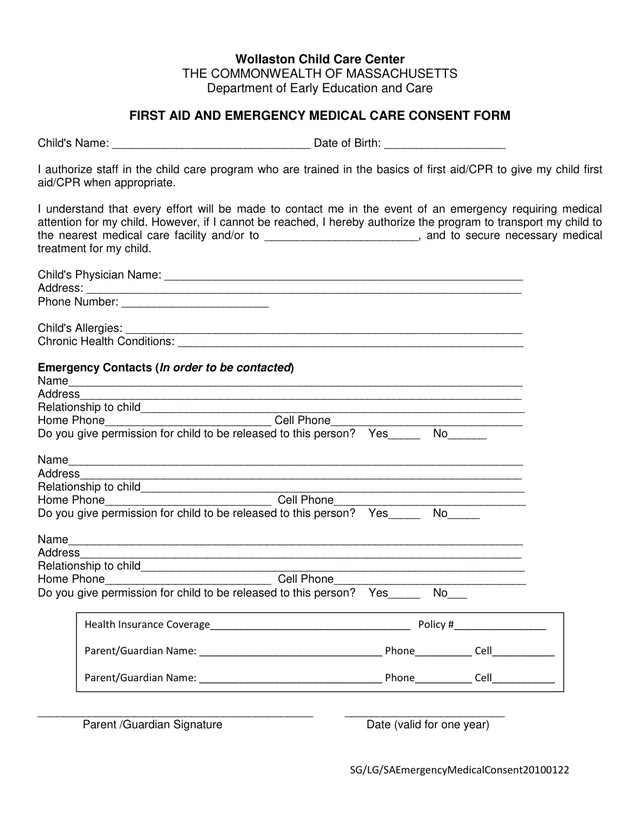
Wollaston Child Care Center
THE COMMONWEALTH OF MASSACHUSETTS
Department of Early Education and Care
FIRST AID AND EMERGENCY MEDICAL CARE CONSENT FORM
Child's Name: _______________________________ Date of Birth: ___________________
I authorize staff in the child care program who are trained in the basics of first aid/CPR to give my child first aid/CPR when appropriate.
I understand that every effort will be made to contact me in the event of an emergency requiring medical attention for my child. However, if I cannot be reached, I hereby authorize the program to transport my child to the nearest medical care facility and/or to ________________________, and to secure necessary medical treatment for my child.
Child's Physician Name: ________________________________________________________
Address: ____________________________________________________________________
Phone Number: _______________________
Child's Allergies: ______________________________________________________________
Chronic Health Conditions: ______________________________________________________
Emergency Contacts (In order to be contacted)
Name_________________________________
How to fill it
Fill or edit this form in MePDF
- Preview page 1 to confirm the form name and revision.
- Select Fill form to answer the form one page at a time.
- Type an answer for each field; checkboxes and choices use the form’s own options.
- Preview the finished pages, then download the flattened PDF.
- The downloaded copy is image-only, so it cannot be edited as a form again.
Spell names exactly as they appear in the passport. The editor keeps the original layout while you fill the existing fields.