What's inside
Form content
State of Maine
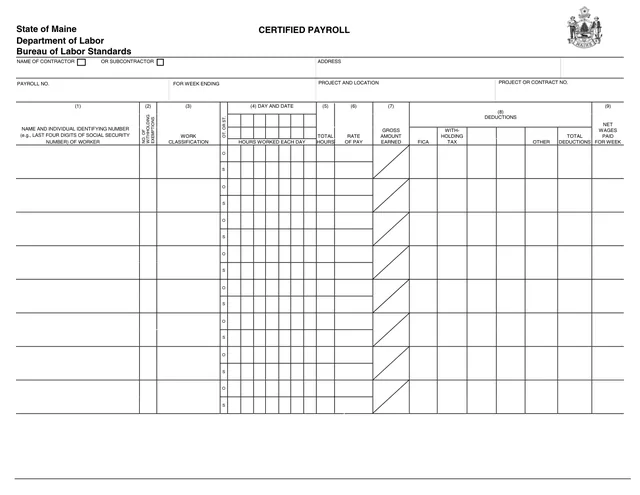
CERTIFIED PAYROLL
Department of Labor
Bureau of Labor Standards
NAME OF CONTRACTOR
OR SUBCONTRACTOR
ADDRESS
PAYROLL NO.
FOR WEEK ENDING
PROJECT AND LOCATION
PROJECT OR CONTRACT NO.
(1)
(2)
(3)
(4) DAY AND DATE
(5)
(6)
(7)
(9)
(8)
DEDUCTIONS
O
O
O
O
O
O
O
O
NAME AND INDIVIDUAL IDENTIFYING NUMBER
(e.g., LAST FOUR DIGITS OF SOCIAL SECURITY
NUMBER) OF WORKER
NO. OF
WITHHOLDiNG
EXEMPTIONS
WORK
CLASSIFICATION
OT. OR ST.
HOURS WORKED EACH DAY
TOTAL
HOURS
RATE
OF PAY
GROSS
AMOUNT
EARNED
FICA
WITH-
HOLDING
TAX
OTHER
TOTAL
DEDUCTIONS
NET
WAGES
PAID
FOR WEEK
S
S
S
S
S
S
S
S
Date: ____________________________
I, ________________________________ ___________________________
(Name of Signatory) (Title) do hereby state:
(1) That I pay or supervise the payment of the persons employed by
___________________________________________________________________________ on the
(Contractor or Subcontractor)
________________________________________; that during the payroll period commencing on the
(Building or Work)
__________ day of _____________, _______, and ending the ______ day of __________, ________, all persons employed on said project have been paid the full weekly wages earned, that n
How to fill it
Fill or edit this form in MePDF
- Preview page 1 to confirm the form name and revision.
- Select Fill form to answer the form one page at a time.
- Type an answer for each field; checkboxes and choices use the form’s own options.
- Preview the finished pages, then download the flattened PDF.
- The downloaded copy is image-only, so it cannot be edited as a form again.
Match the employer's legal name and the employee's tax details. The editor keeps the original layout while you fill the existing fields.