What's inside
Form content
DEPARTMENT OF HEALTH AND HUMAN SERVICES
CENTERS FOR MEDICARE & MEDICAID SERVICES
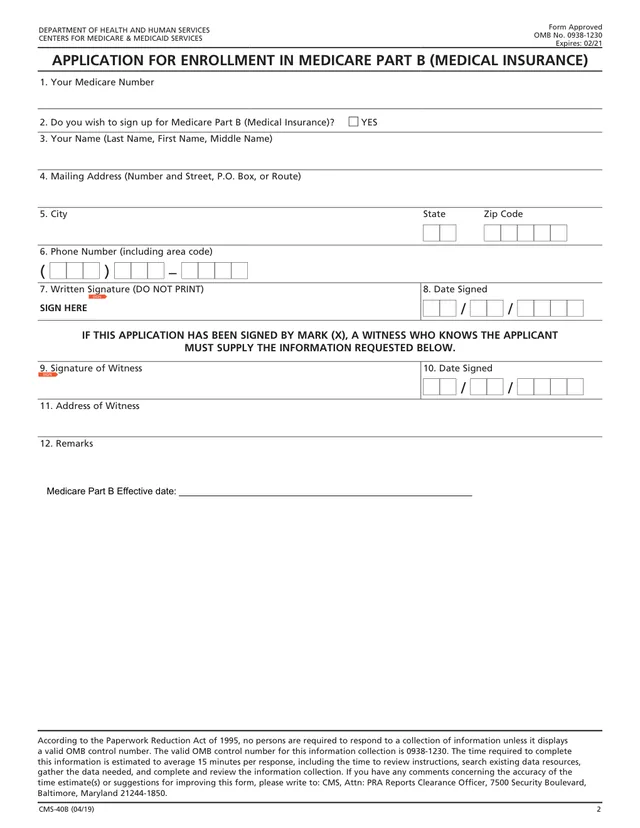
APPLICATION FOR ENROLLMENT IN MEDICARE PART B (MEDICAL INSURANCE)
WHO CAN USE THIS APPLICATION?
People with Medicare who have Part A but not Part B
NOTE: If you do not have Part A, do not complete this form.
Contact Social Security if you want to apply for Medicare for the first time.
WHEN DO YOU USE THIS APPLICATION?
Use this form:
•
If you’re in your Initial Enrollment Period (IEP) and live in
Puerto Rico. You must sign up for Part B using this form.
•
If you’re in your IEP and refused Part B or did not sign up when you applied for Medicare, but now want Part B.
•
If you want to sign up for Part B during the General
Enrollment Period (GEP) from January 1 – March 31 each year.
•
If you refused Part B during your IEP because you had group health plan (GHP) coverage through your or your spouse’s current employment. You may sign up during your 8-month Special Enrollment Period (SEP).
•
If you have Medicare due to disability and refused Part
B during your IEP because you had group health plan coverage through your, your spouse or family member’s current employment.
•
You may sign up during your 8-month SE
How to fill it
Fill or edit this form in MePDF
- Preview page 2 to confirm the form name and revision.
- Select Fill form to answer the form one page at a time.
- Type an answer for each field; checkboxes and choices use the form’s own options.
- Preview the finished pages, then download the flattened PDF.
- The downloaded copy is image-only, so it cannot be edited as a form again.
Fill only the fields that apply and keep a copy of the finished PDF. The editor keeps the original layout while you fill the existing fields.