What's inside
Form content
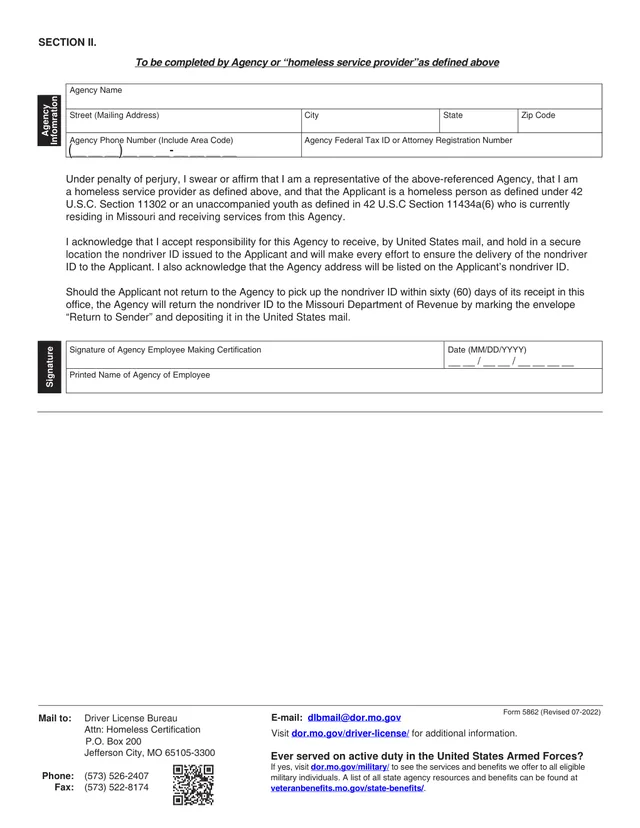
Sections 302.171 and 302.181 RSMo, require applicants to provide residence address as part of the application and card format for a Missouri driver license, permit, or nondriver ID. Missouri regulation 12 CSR 10-24.448 further defines documents that must be submitted as proof of residential address. This certification form is provided for the listed homeless services provider (“Agency”) to attest to the named individual’s homelessness at the time this certification is completed and that the named individual resides within the boundaries of Missouri. Eligible applicants must submit this certification form, completed in full, to the Missouri license office at the time of application for a Missouri nondriver id.
This completed certification form will be retained, along with other eligible documents, as part of the Homeless Status &
Residency application for a Missouri nondriver ID.
This certification does not establish proof of the applicant’s name, date of birth or Social Security number (SSN) as required by Missouri law to obtain Missouri nondriver ID. The applicant must also provide required documents to verify identity, lawful status, SSN, and name change, as applicable from the l
How to fill it
Fill or edit this form in MePDF
- Preview page 2 to confirm the form name and revision.
- Select Fill form to answer the form one page at a time.
- Type an answer for each field; checkboxes and choices use the form’s own options.
- Preview the finished pages, then download the flattened PDF.
- The downloaded copy is image-only, so it cannot be edited as a form again.
Fill only the fields that apply and keep a copy of the finished PDF. The editor keeps the original layout while you fill the existing fields.