What's inside
Form content
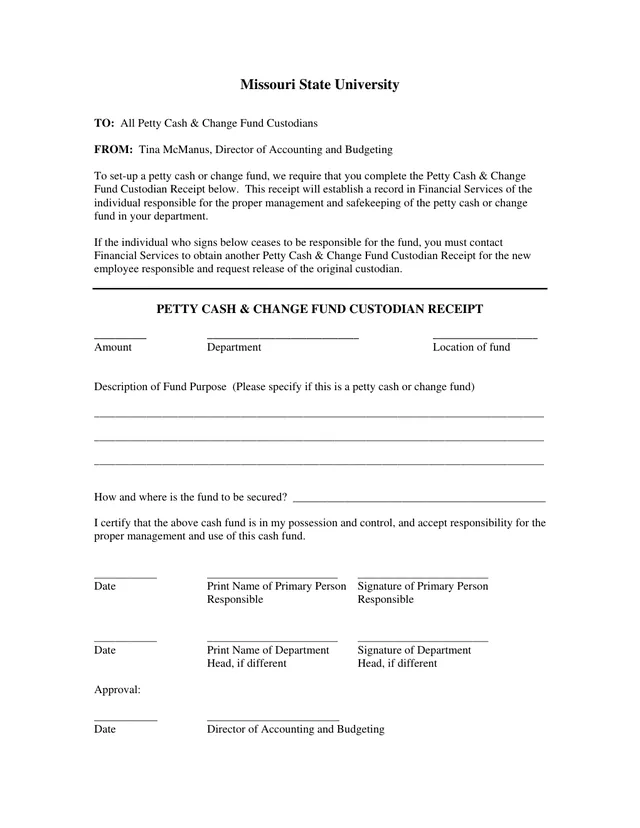
Missouri State University
TO: All Petty Cash & Change Fund Custodians
FROM: Tina McManus, Director of Accounting and Budgeting
To set-up a petty cash or change fund, we require that you complete the Petty Cash & Change
Fund Custodian Receipt below. This receipt will establish a record in Financial Services of the individual responsible for the proper management and safekeeping of the petty cash or change fund in your department.
If the individual who signs below ceases to be responsible for the fund, you must contact
Financial Services to obtain another Petty Cash & Change Fund Custodian Receipt for the new employee responsible and request release of the original custodian.
PETTY CASH & CHANGE FUND CUSTODIAN RECEIPT
__________
_____________________________
____________________
Amount
Department
Location of fund
Description of Fund Purpose (Please specify if this is a petty cash or change fund)
______________________________________________________________________________________
______________________________________________________________________________________
______________________________________________________________________________________
How and where is the fund to be
How to fill it
Fill or edit this form in MePDF
- Preview page 1 to confirm the form name and revision.
- Select Fill form to answer the form one page at a time.
- Type an answer for each field; checkboxes and choices use the form’s own options.
- Preview the finished pages, then download the flattened PDF.
- The downloaded copy is image-only, so it cannot be edited as a form again.
Copy figures exactly from the statement and keep the currency clear. The editor keeps the original layout while you fill the existing fields.