What's inside
Form content
Form N-426 Edition 03/09/23
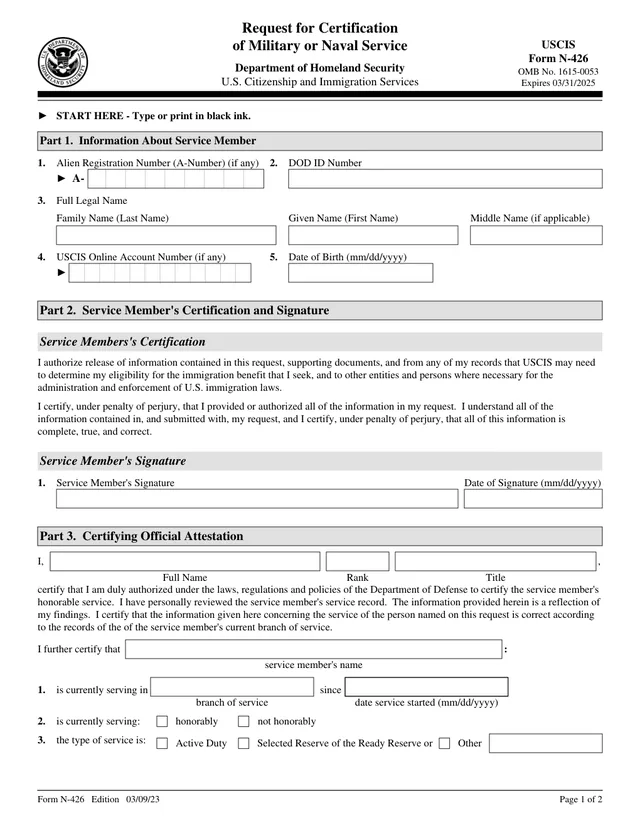
Request for Certification of Military or Naval Service
Department of Homeland Security
U.S. Citizenship and Immigration Services
USCIS
Expires 03/31/2025
Part 1. Information About Service Member
1.
Alien Registration Number (A-Number) (if any)
►A-
DOD ID Number
2.
►
4.
USCIS Online Account Number (if any)
Date of Birth (mm/dd/yyyy)
5.
Family Name (Last Name)
Given Name (First Name)
Middle Name (if applicable)
Full Legal Name
3.
START HERE - Type or print in black ink.
►
Service Members's Certification
Part 2. Service Member's Certification and Signature
I authorize release of information contained in this request, supporting documents, and from any of my records that USCIS may need to determine my eligibility for the immigration benefit that I seek, and to other entities and persons where necessary for the administration and enforcement of U.S. immigration laws.
I certify, under penalty of perjury, that I provided or authorized all of the information in my request. I understand all of the information contained in, and submitted with, my request, and I certify, under penalty of perjury, that all of this information is complete, true, and correct.
Service
How to fill it
Fill or edit this form in MePDF
- Preview page 1 to confirm the form name and revision.
- Select Fill form to answer the form one page at a time.
- Type an answer for each field; checkboxes and choices use the form’s own options.
- Preview the finished pages, then download the flattened PDF.
- The downloaded copy is image-only, so it cannot be edited as a form again.
Fill only the fields that apply and keep a copy of the finished PDF. The editor keeps the original layout while you fill the existing fields.