What's inside
Form content
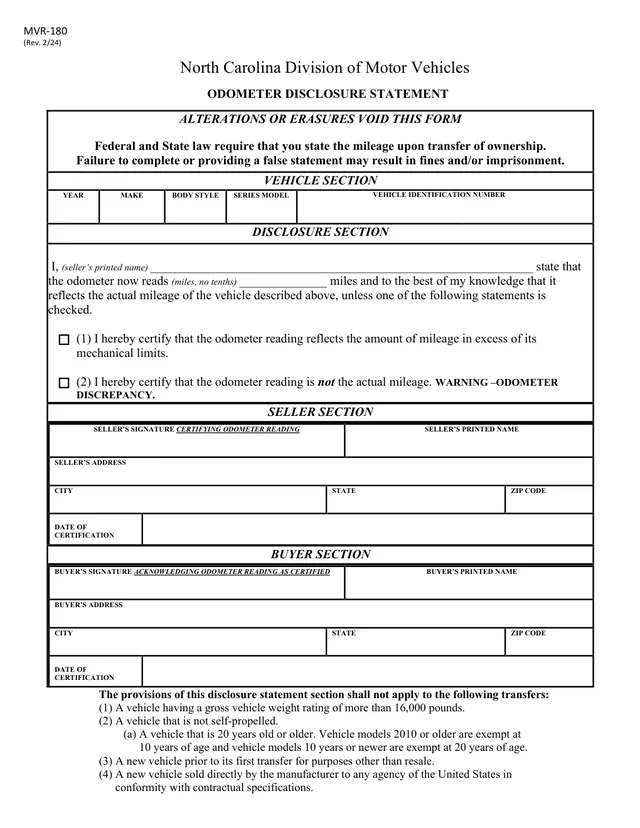
MVR-180
(Rev. 2/24)
North Carolina Division of Motor Vehicles
ODOMETER DISCLOSURE STATEMENT
ALTERATIONS OR ERASURES VOID THIS FORM
Federal and State law require that you state the mileage upon transfer of ownership.
Failure to complete or providing a false statement may result in fines and/or imprisonment.
VEHICLE SECTION
YEAR
MAKE
BODY STYLE
SERIES MODEL
VEHICLE IDENTIFICATIO N NUMBER
DISCLOSURE SECTION
I, (seller’s printed name) state that the odometer now reads (miles, no tenths) miles and to the best of my knowledge that it reflects the actual mileage of the vehicle described above, unless one of the following statements is checked.
(1) I hereby certify that the odometer reading reflects the amount of mileage in excess of its mechanical limits.
(2) I hereby certify that the odometer reading is not the actual mileage. WARNING –ODOMETER
DISCREPANCY.
SELLER SECTION
SELLER’S SIGNATURE CERTIFYING ODOMETER READING
SELLER’S PRINTED NAME
SELLER’S ADDRESS
CITY
STATE
ZIP CODE
DATE OF
CERTIFICATION
BUYER SECTION
BUYER’S SIGNATURE ACKNOWLEDGING ODOMETER READING AS CERTIFIED
BUYER’S PRINTED NAME
BUYER’S ADDRESS
CITY
STATE
ZIP CODE
DATE OF
CERTIFICATION
The provisions of this disclosure st
How to fill it
Fill or edit this form in MePDF
- Preview page 1 to confirm the form name and revision.
- Select Fill form to answer the form one page at a time.
- Type an answer for each field; checkboxes and choices use the form’s own options.
- Preview the finished pages, then download the flattened PDF.
- The downloaded copy is image-only, so it cannot be edited as a form again.
Fill only the fields that apply and keep a copy of the finished PDF. The editor keeps the original layout while you fill the existing fields.