What's inside
Form content
www.legalaidnyc.org
Last modified 12-09-2024
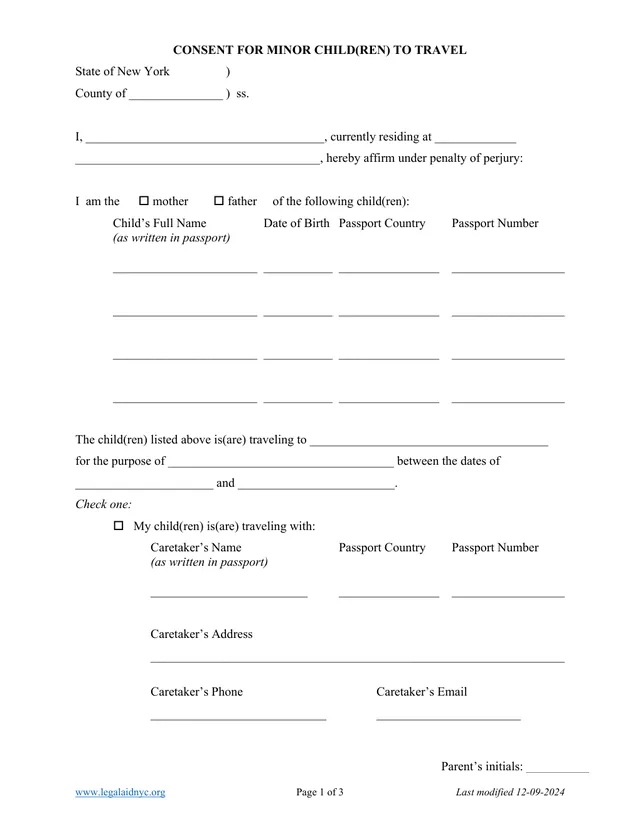
CONSENT FOR MINOR CHILD(REN) TO TRAVEL
State of New York
)
County of _______________ ) ss.
I, ______________________________________, currently residing at _____________
_______________________________________, hereby affirm under penalty of perjury:
I am the mother father of the following child(ren):
Child’s Full Name
Date of Birth Passport Country
Passport Number
(as written in passport)
_______________________ ___________ ________________ __________________
_______________________ ___________ ________________ __________________
_______________________ ___________ ________________ __________________
_______________________ ___________ ________________ __________________
The child(ren) listed above is(are) traveling to ______________________________________ for the purpose of ____________________________________ between the dates of
______________________ and _________________________.
Check one:
My child(ren) is(are) traveling with:
Caretaker’s Name
Passport Country
Passport Number
(as written in passport)
_________________________
________________ __________________
Caretaker’s Address
___________________________________________
How to fill it
Fill or edit this form in MePDF
- Preview page 1 to confirm the form name and revision.
- Select Fill form to answer the form one page at a time.
- Type an answer for each field; checkboxes and choices use the form’s own options.
- Preview the finished pages, then download the flattened PDF.
- The downloaded copy is image-only, so it cannot be edited as a form again.
Spell names exactly as they appear in the passport. The editor keeps the original layout while you fill the existing fields.