What's inside
Form content
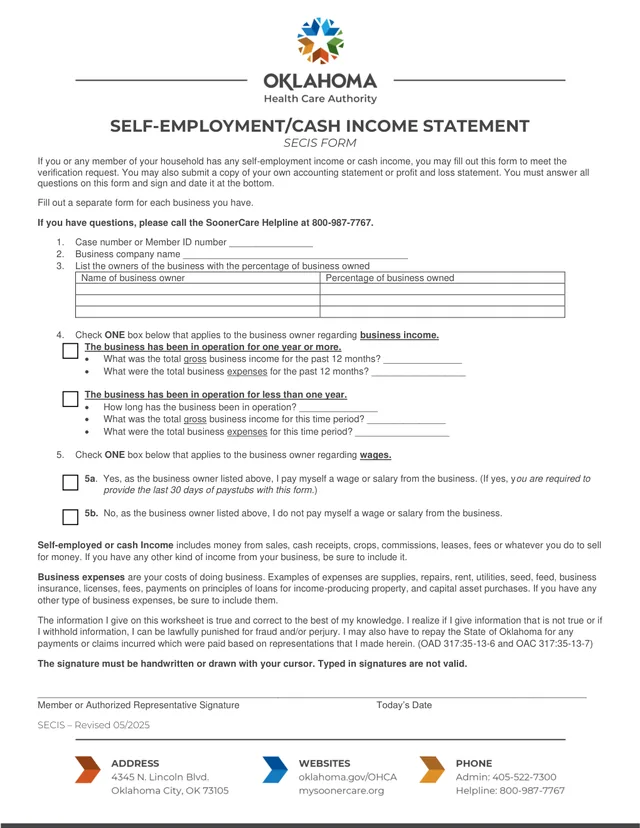
SELF-EMPLOYMENT/CASH INCOME STATEMENT
SECIS FORM
If you or any member of your household has any self-employment income or cash income, you may fill out this form to meet the verification request. You may also submit a copy of your own accounting statement or profit and loss statement. You must answer all questions on this form and sign and date it at the bottom.
Fill out a separate form for each business you have.
If you have questions, please call the SoonerCare Helpline at 800-987-7767.
1.
Case number or Member ID number ________________
2.
Business company name ___________________________________________
3.
List the owners of the business with the percentage of business owned
Name of business owner
Percentage of business owned
4.
Check ONE box below that applies to the business owner regarding business income.
The business has been in operation for one year or more.
•
What was the total gross business income for the past 12 months? _______________
•
What were the total business expenses for the past 12 months? __________________
The business has been in operation for less than one year.
•
How long has the business been in operation? _______________
•
What was the total gross bus
How to fill it
Fill or edit this form in MePDF
- Preview page 1 to confirm the form name and revision.
- Select Fill form to answer the form one page at a time.
- Type an answer for each field; checkboxes and choices use the form’s own options.
- Preview the finished pages, then download the flattened PDF.
- The downloaded copy is image-only, so it cannot be edited as a form again.
Match the employer's legal name and the employee's tax details. The editor keeps the original layout while you fill the existing fields.