What's inside
Form content
You can either download this form to your computer and complete it electronically or print it and complete it by hand.
Either way, please complete all sections, sign and date the last page (your actual signature is required), and mail or email it to your loan officer.
With respect to completion of the Asset and Liabilities sections, entries should be made as follows:
Assets:
• The “Applicant” column should include entries for assets owned SOLELY by the Applicant.
• The “Co-Applicant” column should include entries for assets owned SOLELY by the Co-Applicant.
• The “Joint” column should include entries for assets owned by either the Applicant or Co-Applicant jointly with any other party, including each other.
Liabilities:
• The “Applicant” column should include entries for obligations owed SOLELY by the Applicant.
• The “Co-Applicant” column should include entries for obligations owed SOLELY by the Co-Applicant.
• The “Joint” column should include entries for obligations owed by either the Applicant or Co-Applicant jointly with any other party, including each other.
Read carefully, check the applicable box and complete the form accordingly:
n Individual Credit: If you are applying fo
How to fill it
Fill or edit this form in MePDF
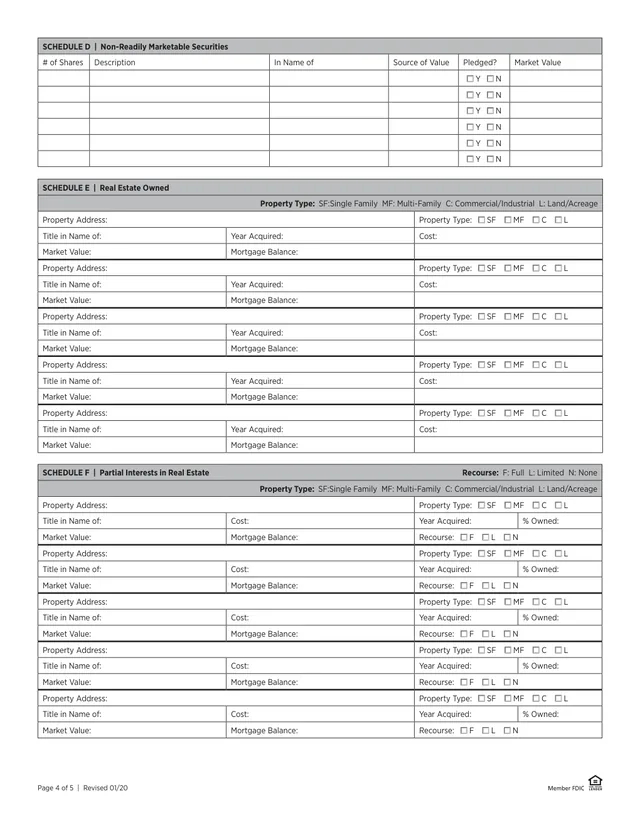
- Preview page 4 to confirm the form name and revision.
- Select Fill form to answer the form one page at a time.
- Type an answer for each field; checkboxes and choices use the form’s own options.
- Preview the finished pages, then download the flattened PDF.
- The downloaded copy is image-only, so it cannot be edited as a form again.
Copy figures exactly from the statement and keep the currency clear. The editor keeps the original layout while you fill the existing fields.