What's inside
Form content
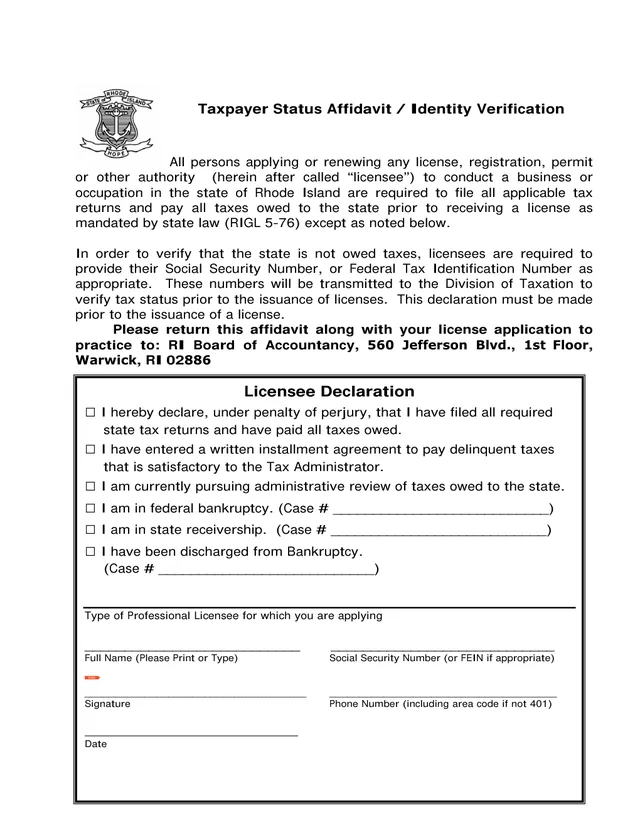
Taxpayer Status Affidavit / Identity Verification
All persons applying or renewing any license, registration, permit or other authority (herein after called “licensee”) to conduct a business or occupation in the state of Rhode Island are required to file all applicable tax returns and pay all taxes owed to the state prior to receiving a license as mandated by state law (RIGL 5-76) except as noted below.
In order to verify that the state is not owed taxes, licensees are required to provide their Social Security Number, or Federal Tax Identification Number as appropriate. These numbers will be transmitted to the Division of Taxation to verify tax status prior to the issuance of licenses. This declaration must be made prior to the issuance of a license.
Please return this affidavit along with your license application to practice to: RI Board of Accountancy, 560 Jefferson Blvd., 1st Floor,
Warwick, RI 02886
Licensee Declaration
□I hereby declare, under penalty of perjury, that I have filed all required state tax returns and have paid all taxes owed.
□I have entered a written installment agreement to pay delinquent taxes that is satisfactory to the Tax Administrator.
□I am currently pur
How to fill it
Fill or edit this form in MePDF
- Preview page 1 to confirm the form name and revision.
- Select Fill form to answer the form one page at a time.
- Type an answer for each field; checkboxes and choices use the form’s own options.
- Preview the finished pages, then download the flattened PDF.
- The downloaded copy is image-only, so it cannot be edited as a form again.
Keep the tax year and filing status consistent on every page. The editor keeps the original layout while you fill the existing fields.