What's inside
Form content
-
I
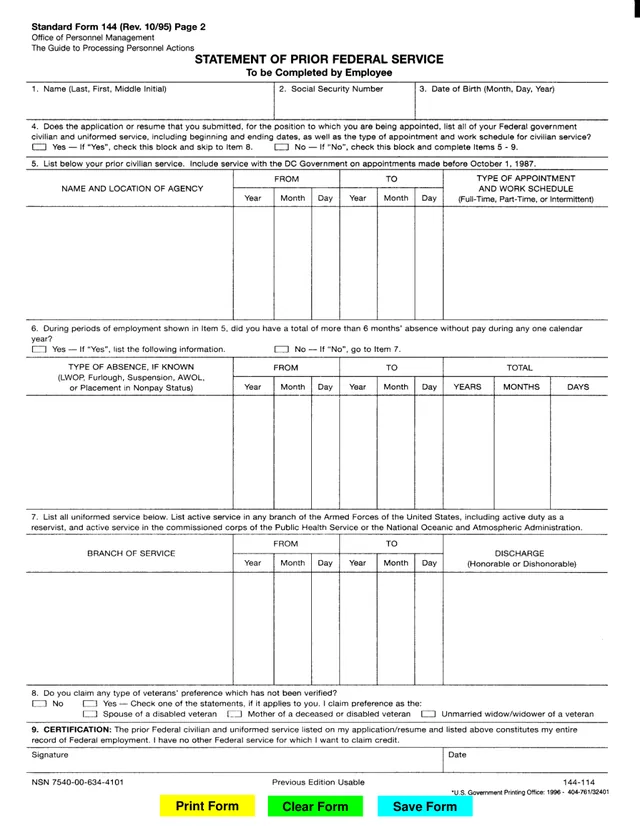
STANDARD FORM 144 (Rev. 10/95)
Office of Personnel Management
The Guide to Processing Personnel Actions
Statement of Prior Federal Service
(PLEASE READ THE FOLLOWING INFORMATION BEFORE COMPLETING THIS FORM)
Privacy Act Statement
Section 6303 of 5 U.S.C., "Annual Leave Accrual," authorizes col lection of information to determine and record service that may be creditable for accrual of annual leave. Part 351.503, 5 C.F.R.,
"Length of Service," authorizes collection of data to determine and record service that may be creditable for reduction-in-force reten tion purposes.
Information about prior Federal civilian and military service is col lected and maintained in your Official Personnel Folder (OPF). The information you furnish may be disclosed to other Federal agencies or Congressional or Judicial Offices in order to verify it or in con nection with your application for a job, license, grant, or other ben efit. It may also be disclosed to a national, state, or local law enforcement agency where there is indication of a violation or potential violation of civil or criminal law or regulation, or to another
Federal agency or court when the Government is party to a suit.
Furnishing t
How to fill it
Fill or edit this form in MePDF
- Preview page 2 to confirm the form name and revision.
- Select Fill form to answer the form one page at a time.
- Type an answer for each field; checkboxes and choices use the form’s own options.
- Preview the finished pages, then download the flattened PDF.
- The downloaded copy is image-only, so it cannot be edited as a form again.
Fill only the fields that apply and keep a copy of the finished PDF. The editor keeps the original layout while you fill the existing fields.