What's inside
Form content
(Rev. December 2019)
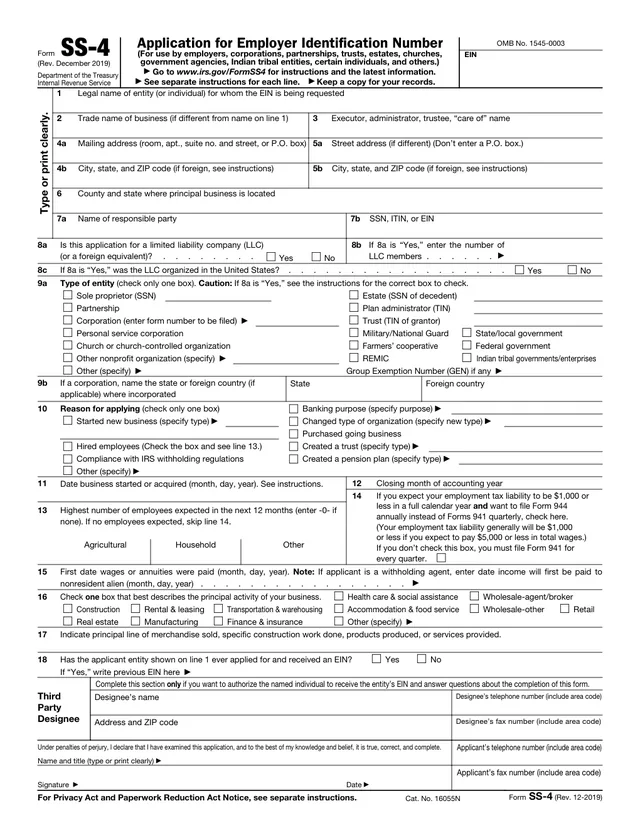
Application for Employer Identification Number
(For use by employers, corporations, partnerships, trusts, estates, churches, government agencies, Indian tribal entities, certain individuals, and others.)
▶ Go to www.irs.gov/FormSS4 for instructions and the latest information.
▶ See separate instructions for each line.
▶ Keep a copy for your records.
EIN
Type or print clearly.
1 Legal name of entity (or individual) for whom the EIN is being requested
2 Trade name of business (if different from name on line 1)
3 Executor, administrator, trustee, “care of” name
4a Mailing address (room, apt., suite no. and street, or P.O. box) 5a Street address (if different) (Don’t enter a P.O. box.)
4b City, state, and ZIP code (if foreign, see instructions)
5b City, state, and ZIP code (if foreign, see instructions)
6 County and state where principal business is located
7a Name of responsible party
7b SSN, ITIN, or EIN
8a
Is this application for a limited liability company (LLC)
(or a foreign equivalent)?
.
.
.
.
.
.
.
.
Yes
No
8b
If 8a is “Yes,” enter the number of
LLC members .
.
.
.
.
. ▶
8c
If 8a is “Yes,” was the LLC organized in the United States?
.
.
.
.
.
.
.
.
.
.
.
.
How to fill it
Fill or edit this form in MePDF
- Preview page 1 to confirm the form name and revision.
- Select Fill form to answer the form one page at a time.
- Type an answer for each field; checkboxes and choices use the form’s own options.
- Preview the finished pages, then download the flattened PDF.
- The downloaded copy is image-only, so it cannot be edited as a form again.
Fill only the fields that apply and keep a copy of the finished PDF. The editor keeps the original layout while you fill the existing fields.